

How to Read Roblox Script Errors (Beginner Guide)
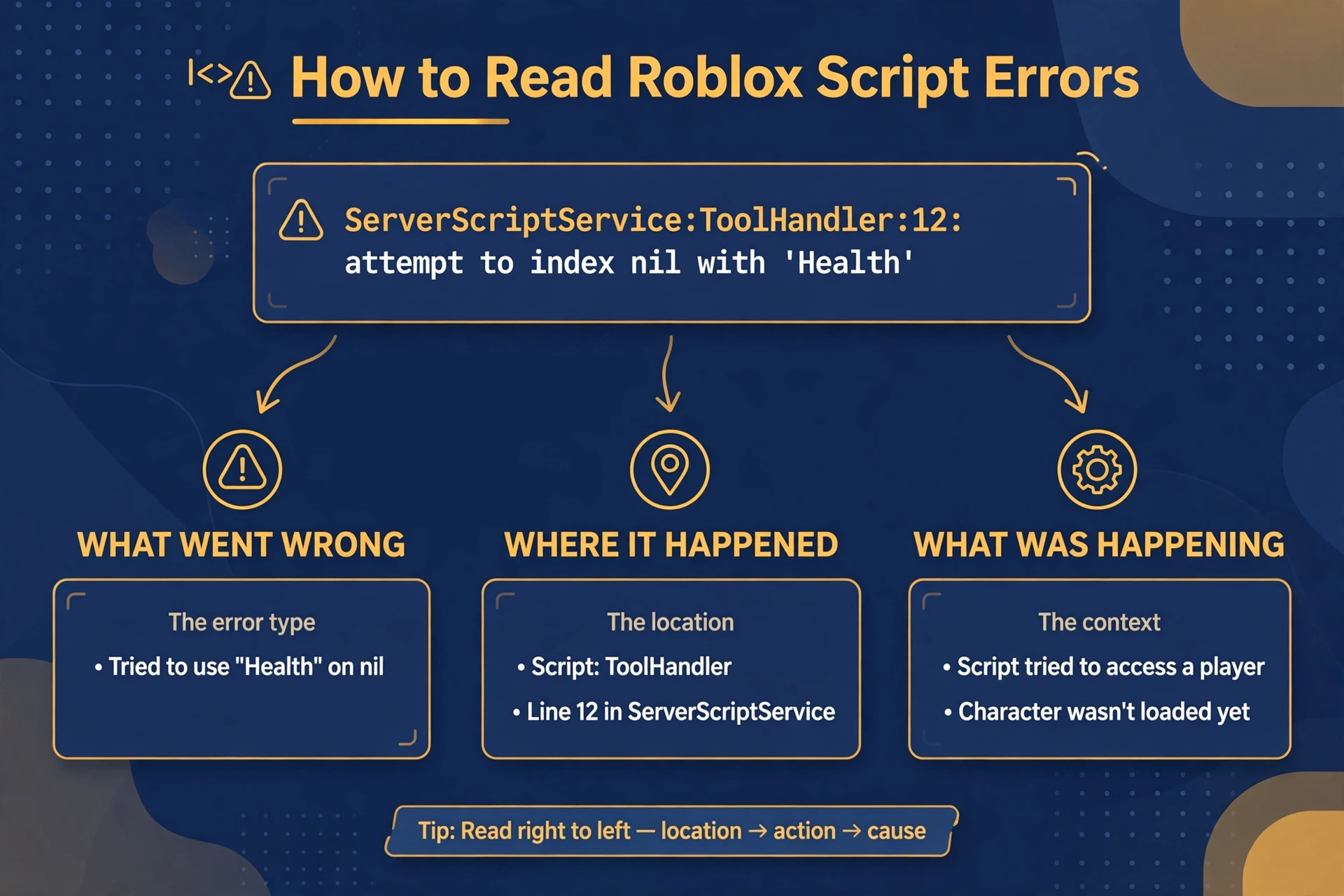
An error message is the game or executor telling you exactly where it stopped and why. Once you know how to read Roblox script errors, most of them stop looking scary. This guide covers roblox script error meanings in plain words, with no code, so you can understand roblox error messages and decide what to check first.
Quick Answers
| Question | Short answer |
|---|---|
| What is an error message really telling you? | It reports what went wrong, where it was noticed, and what the game was doing at that moment. |
| What is the first thing to read in any error? | The description of the problem, then the line number. |
| When is an error not your fault? | When the game updated, the executor has a problem, or the script source was removed. |
| Can one error hide another? | Yes. Fixing the first one often reveals the next. |
The 3 parts of every error message
Almost every error has the same three parts. Learning to spot them is the core skill in how to read roblox script errors.
Part 1: what went wrong. This is the plain description, such as a missing value or a bad symbol. It is the most important part.
Part 2: where it happened. This is usually a line number, sometimes with a script name. It points to where the problem was noticed.
Part 3: what the parser or game was doing. This is the context. The parser reads your text before running it, and the game then runs it step by step. The message tells you which stage failed.
If the message mentions reading or compiling, the text itself is broken. If it mentions running, the text was valid but something went wrong during use.
Read all three parts before you touch anything. Beginners often jump straight to the line number and miss the description.
The 8 error types beginners meet most
These roblox script error meanings cover most of what you will see. The wording varies slightly between tools, but the ideas stay the same.
| Error type (plain words) | What it usually means | First check |
|---|---|---|
| Syntax error | The text breaks the language rules, like a missing or misplaced piece. | Look at the reported line and the line above it. |
| Expected “end” | A block was opened but never closed. | Count your opened and closed blocks. |
| Unexpected symbol | A character appeared where the parser did not expect one. | Look for stray quotes, brackets, or pasted characters. |
| Attempt to use a nil value | Something you asked for does not exist, or is empty. | Check the spelling and whether the item has loaded yet. |
| Bad argument | A function received the wrong kind of input, or none. | Check what the function expects and what you gave it. |
| Index error | You tried to look inside something that is not there. | Check the thing before the dot or bracket. |
| Attempt to call a non-function | You treated something as an action when it is not one. | Check for a name clash or a wrong variable. |
| Stack overflow | Something kept calling itself without stopping. | Look for a loop of actions that never ends. |
A nil value error is the most common one for beginners. It almost always means a name is misspelled or an object was not ready yet.
How to read a line number properly
The line number is where the problem was noticed, not always where it started.
The parser reads top to bottom. It only realizes something is wrong when it hits text that no longer makes sense. That can be several lines after the real mistake.
Use this routine:
Go to the reported line. Check the line directly above it. Check the last block you edited, even if it is far away.
A missing closing piece is the classic case. The error appears at the very end of the script, but the cause is a block opened much earlier.
If the line number is larger than your script, the text may have been changed after loading. In that case, recopy the original and test again.
From error to fix: how to read Roblox script errors in practice
Follow these steps in order. They work for any error, including ones you have never seen.
- Read it fully. Do not stop at the first few words.
- Copy the exact wording. Paste it into a note. Exact wording helps when you search or ask for help.
- Search the wording in general terms. Remove names that are unique to your script. Search for the core phrase, for example the error type and the word “Roblox”.
- Fix one thing at a time. Changing many things at once makes it impossible to know what worked.
- Re-check after each fix. Run it again and compare the new message with the old one.
- Use the validator. The Lua validator tool can catch structure problems before you run anything. It is a helper for spotting mistakes, not a guarantee that a script will behave as you expect.
If you keep getting stuck, read the Lua basics guide to learn the vocabulary behind these messages.
Errors that are not about your script
Sometimes you did nothing wrong. Three situations are common.
The game updated. Developers change their games often. Names and objects that a script relied on can move or disappear, which leads to nil value and index errors.
An executor-side problem. The tool itself may be out of date, restarting, or having trouble. The error may appear on scripts that used to run fine.
The source was removed. If a script is loaded from an online location, that location may be gone or changed. The error then points to a missing or empty result, not a mistake in your text.
When several scripts fail at once, suspect one of these causes. Check the status page of the tool you use, and compare notes with other users before you rewrite anything. Browse the script library for guides, and always treat any script from outside sources with caution.
FAQ
Why do errors look so cryptic?
Errors are written for programmers, so they use technical terms and skip explanations. Once you learn the eight common types above, most messages become readable.
Why does the same error appear for different problems?
The same message describes a symptom, not a single cause. A nil value error can come from a typo, a missing object, or bad timing, so you must check the context each time.
Should I ignore warnings?
No, but treat them as lower priority than errors. A warning means the script can still run but something may behave oddly, so read it and decide if it matters.
Can one error hide another?
Yes. The parser stops at the first problem it finds, so later problems stay invisible until the first is fixed. This is why you should fix one thing and test again.
Do I need to learn Lua to fix errors?
You do not need to be fluent, but basic vocabulary helps a great deal. Knowing what a block, a value, and a function are lets you understand what the message is pointing at.
What do I do with an error I have never seen?
Copy the exact wording, search it in general terms, and check the line and the line above it. If nothing helps, ask for help with the full message and a short description of what you were doing.
Related Guides
xdeltaexecutor.com is an independent guide site and is not affiliated with Delta Executor or Roblox.