

How to Write Your First Lua Script for Delta (Basics)
A Lua script is a plain text file of instructions, and your first one can be a single line. This guide explains how to write a lua script delta users can run, using only generic language basics. It is a Delta Executor Lua tutorial for beginners, not a script collection.
Last reviewed: October 2026
Quick Answers
| Question | Short answer |
|---|---|
| What is Lua? | A small, beginner-friendly scripting language. Roblox uses Luau, its own version of Lua 5.1. |
| Do I need to know Lua to use Delta? | No, not to run existing scripts. Basic Lua helps you read a script and fix errors. |
| Is writing my own script risky? | Yes. Third-party executors can break Roblox’s rules and lead to bans, and scripts can stop working after updates. |
| What is the simplest first script? | print(“Hello”) |
What Lua is, in plain English
A note on sources: Delta Executor is a third-party tool, not made by Roblox, and this site is an independent guide. Facts about the Lua language come from Roblox’s public documentation. Anything about how executors behave in practice is community knowledge, and it is labeled that way.
Lua is a lightweight scripting language. You write instructions as text, and a program reads them from top to bottom.
Roblox’s documentation says its scripts use Luau, which is derived from Lua 5.1. All valid Lua 5.1 code is valid Luau, but the reverse is not always true. The same docs say most Lua books and online resources still broadly apply. That is why general Lua lessons are useful here.
Roblox has used Lua since around 2006, according to the official Luau project. Over time it built its own version for better speed, tooling, and type checking.
Delta also uses it for a simple reason, which is community knowledge. Executors run scripts written in the same language Roblox games use. I cannot confirm Delta’s internals, and the functions available in an executor can differ from what Roblox Studio offers.
At a high level, a script is a list of instructions. Each line tells the program to do one small thing, such as show a message, store a number, or repeat a task.
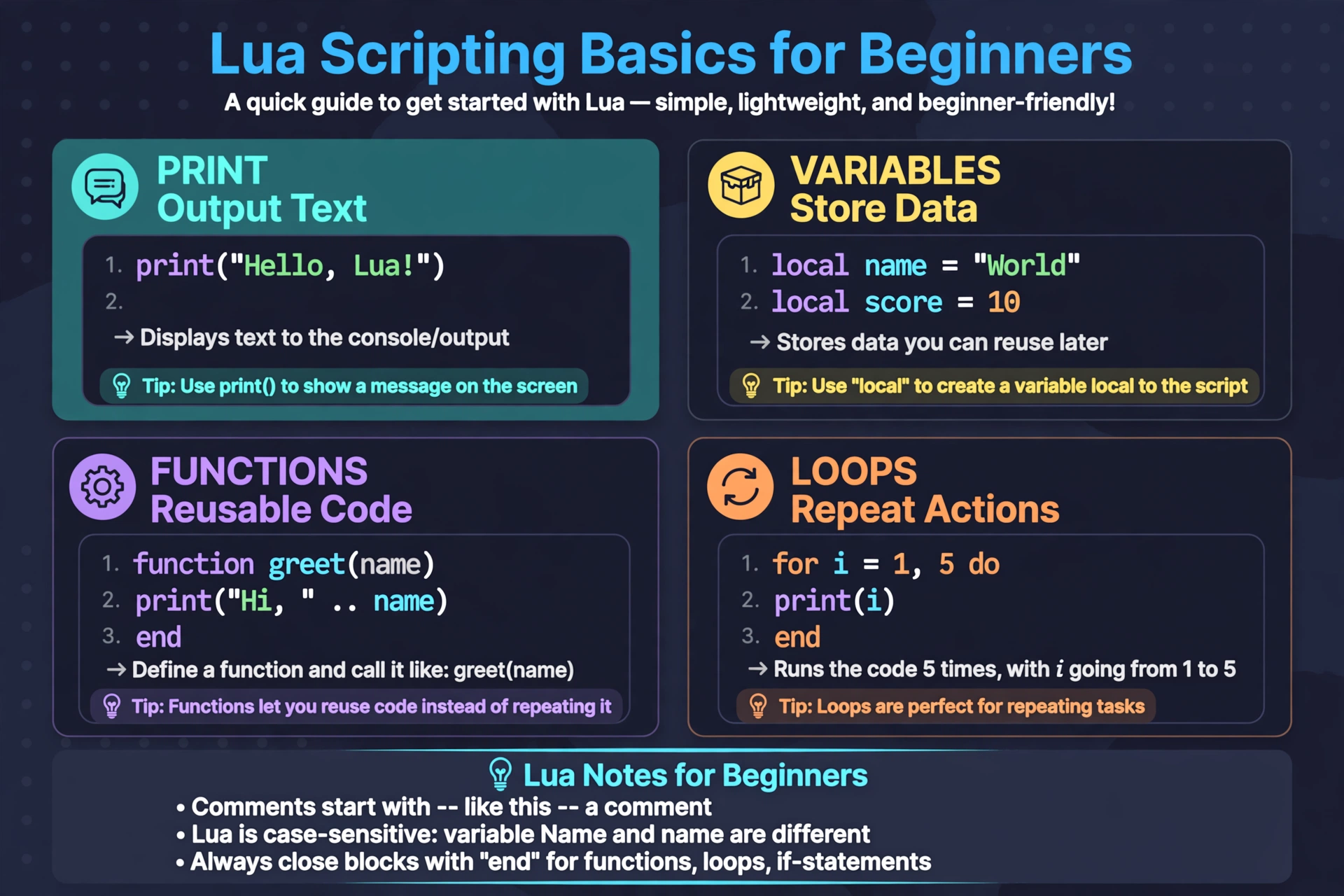
Lua script basics Delta beginners need: print, variables, functions, loops
These are the four ideas to learn first. Every example below is generic and does nothing to any game.
Print. It displays a message so you can see that your script ran.
print("Hello, world!")Variables. A variable stores a value under a name. Roblox’s docs recommend the local keyword for almost every variable.
local playerName = "Sam"
local score = 0
score = score + 10
print(playerName, score)
Functions. A function is a reusable block of instructions. Define it once, then call it by name.
local function greet(name)
  print("Welcome, " .. name)
end

greet("Sam")
greet("Alex")
The two dots join text together. Every function needs a matching end.
Loops. A loop repeats instructions. A numeric loop counts for you.
for i = 1, 3 do
  print("Count: " .. i)
end
You can also loop over a list. Lua lists start at position 1, not 0.
local fruits = {"apple", "pear", "plum"}
for index, fruit in fruits do
  print(index, fruit)
end
That loop style, with no ipairs call, is a Luau feature that Roblox’s docs describe. If a tutorial uses ipairs(fruits), that still works too.
If you want a gentler place to practice these lua script basics delta users need, Roblox Studio is the official tool for learning Luau. Its Output window shows your results in a controlled setting.
How to write a Lua script Delta can run: conceptual steps
The exact buttons depend on the app and its current layout, so check the app itself. The general flow is the same for most executors.
- Write the script. Use a notes app or any plain text editor. Start with a single print line.
- Copy it. Select all the text and copy it.
- Paste it into the executor. Delta has a script input area. Paste your text there.
- Execute. Press the execute or run button while you are in a Roblox game.
- Check for errors. Read any error message carefully. Many players check Roblox’s developer console, which opens with F9 on PC. This is community knowledge, and mobile steps can differ.
- Test on an alt account. Never test an unfamiliar script on an account you care about.
For a step-by-step walkthrough of the app side, see the beginner’s guide to using scripts in Delta Executor.
Keep your first scripts tiny. A one-line print tells you whether the whole pipeline works before you add anything else.
Delta Executor Lua tutorial: common beginner errors and how to fix them
Most beginner problems fall into a few groups. Fix them in this order.
- Missing end, then, or do. Every if needs then and end. Every function and loop needs its own end. Count them, and indent your code so you can see the pairs.
- Unclosed quotes or brackets. If you open a quote, a parenthesis, or a curly brace, close it. A message about something being “expected near” a symbol usually points to this.
- Typos and wrong capitalization. Lua is case sensitive. Print is not print, and Score is not score. A misspelled name often produces no useful hint at all.
- “Attempt to index nil.” Roblox’s developer community explains that the problem is usually the value before the dot, not the name after it. Something you expected to exist was not found. Check the spelling and whether the object has loaded yet.
- Starting a list at 0. In Lua, the first item is at position 1.
- Outdated scripts. If a script that once ran now fails, the game or the executor may have changed. You cannot fix that by editing a single line. More on this below.
To catch syntax mistakes before you run anything, paste your code into the Lua validator tool. It works as a script error checker for missing end words and unclosed brackets. It cannot tell you whether a script will work inside a particular game.
Browsing finished scripts can also help you learn how real code is laid out. Our script library is organized for reading and learning, but no listing there is a promise that a script works.
The honest limits of writing your own scripts
Learning Lua is harmless. Running scripts through a third-party executor in Roblox games is where the risk sits.
Scripts break. Games update, and executors update. A script that ran last month can fail without warning. Nobody can guarantee a script will keep working.
Bans are possible. Multiple independent sources report that Roblox treats unauthorized third-party software and exploiting as a violation of its rules, and that this can lead to account moderation or permanent bans. Enforcement can also come later, not right away. Our guide on whether you can get banned for using Delta Executor covers this in more detail.
An alt account is not a guarantee. It limits what you lose if something goes wrong. It does not make a script allowed, and it does not stop moderation.
“Undetected” is marketing. No public evidence supports any such promise, and Roblox updates its systems regularly. Treat any page claiming a script is undetected, verified, or guaranteed to work with suspicion.
Never share account details. Do not enter your password, cookie, or verification code into any executor or script site.
If your goal is simply to learn Lua, Roblox Studio is the official place to do it, with no ban risk.
Frequently Asked Questions
What is Lua?
Lua is a lightweight scripting language that is easy for beginners to read. Roblox uses Luau, a version of Lua 5.1 that adds speed and extra features. Because they are so close, most Lua lessons carry over.
Do I need Lua to use Delta Executor?
No, you do not need Lua just to run an existing script. Knowing basic Lua helps you understand what a script is doing, spot obvious problems, and fix simple errors. It also helps you notice when something looks wrong.
What is the simplest first script?
The simplest first script is print(“Hello”). It has one line and one job, which is to show a message. If it runs, you know your pasting and execution steps work.
Why does my script show an error?
Most errors come from small typing mistakes. Check for a missing end, an unclosed quote or bracket, a misspelled name, or wrong capitalization. Paste the code into the Lua validator to catch syntax problems quickly.
Why did my script stop working after an update?
A script usually stops working because the game or the executor changed. Scripts often depend on things inside a specific game, and developers change those things without notice. Outdated scripts generally need to be rewritten or replaced.
Can I get banned for my own script?
Yes, a ban is possible even if you wrote the script yourself. Roblox’s rules cover unauthorized third-party software, and the risk comes from using the executor, not from who wrote the code. Read the ban risks guide before you decide.
Related Guides
Delta Executor scripts library
Browse scripts by game and learn how finished scripts are laid out.
Lua validator: script error checker
Catch missing end words and unclosed brackets before you run anything.
Can you get banned for using Delta Executor?
The honest ban risks, alt accounts, and what moderation really means.