

How to Use Scripts in Delta Executor: Beginner’s Guide
Learning how to use scripts in Delta Executor is mostly about three things: picking a script for the right game, pasting it completely, and testing it on an alt account. This guide covers the generic steps, the mistakes beginners make most, and what to check when nothing happens.
Last reviewed: October 2026
In This Guide
- Quick Answers
- What Is a Script in This Context?
- Confirmed Facts vs Community Knowledge
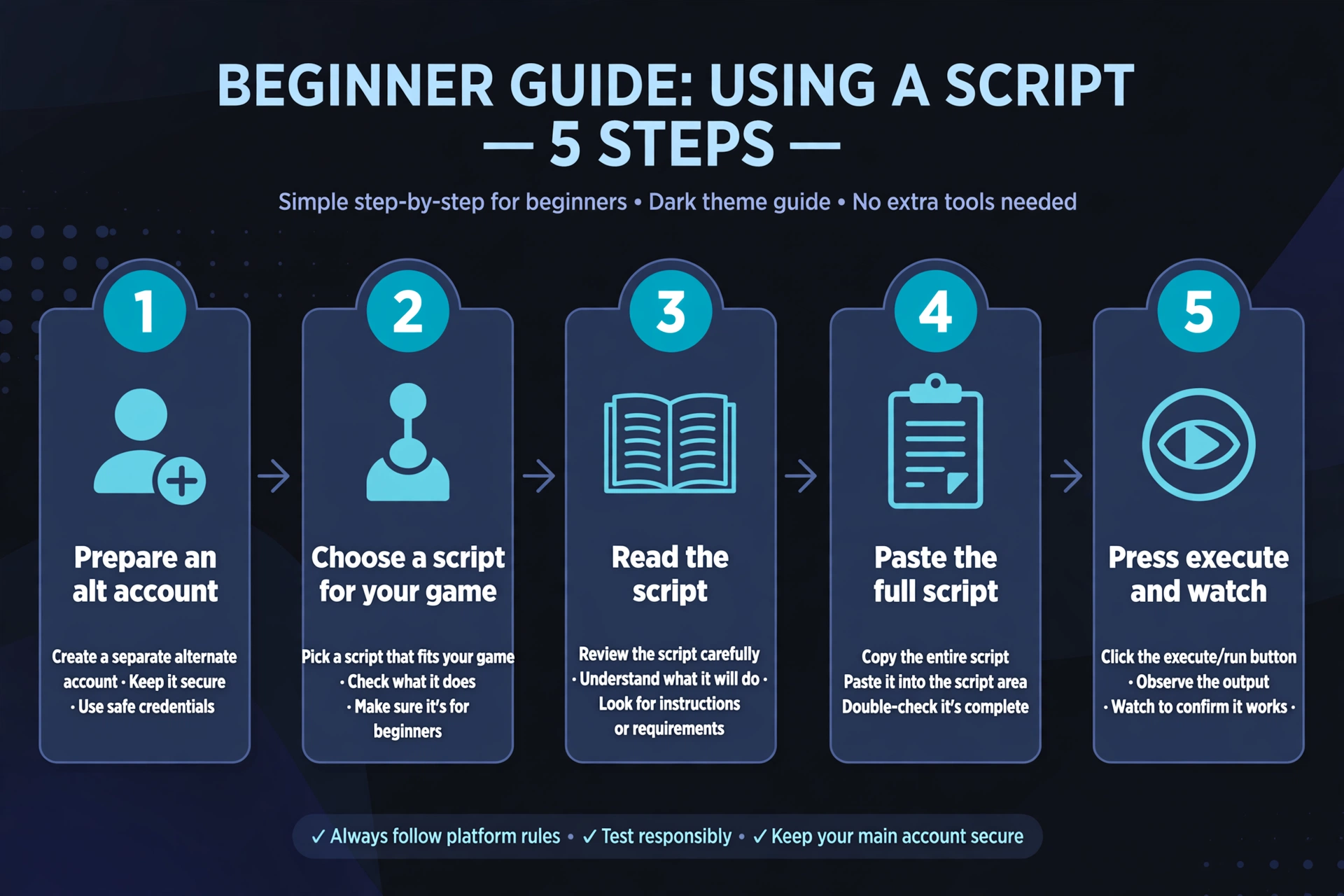
- How to use scripts in Delta Executor: the 5 steps
- Where Do Scripts Go?
- Do You Need a Key for Every Script?
- Common beginner mistakes with delta executor scripts
- Script Sources Compared
- What to do when a script does not run
- A Short Habit List to Use Scripts Delta Executor Beginners Can Follow
- Final Thoughts
Quick Answers
We are an independent guide site. We do not make Delta Executor or the scripts people run in it. Everything below is general guidance, not a promise that any particular script works.
| Question | Short answer |
|---|---|
| How to use scripts in Delta Executor | Open the executor, paste the script into its script area, join the matching game, then press execute. |
| Where do scripts go | Into the executor’s script input area, not into Roblox itself or a chat box. |
| Do you need a key for every script | No. Whether a key is needed depends on the script or the loader it comes from, and it varies. |
| Are scripts guaranteed to work | No. Scripts come from community developers and quality varies. |
What Is a Script in This Context?
A script is a block of Lua code written by a community developer. Delta Executor is a third-party tool that lets you run that code inside Roblox.
Delta Executor scripts are not made or reviewed by Roblox. They are also not made by this site. Each one is the work of whoever wrote it.
Confirmed Facts vs Community Knowledge
Some points are well documented. Others come from player experience and can change.
Confirmed:
- Roblox’s rules prohibit exploiting and unauthorized modification of the client. Using any executor can put your account at risk of a ban.
- A script runs with the access the executor gives it. A badly written or malicious script can cause harm.
Community knowledge (anecdotal, not verified by us):
- Scripts often stop working after a game or Roblox update.
- Some scripts sit behind key systems or ad-gated links.
- Scripts are usually written for one game and may do nothing in another.
We cannot give reliable numbers on how often any of these happen. Be skeptical of any site that does.
How to use scripts in Delta Executor: the 5 steps
These steps are deliberately generic. Button names and layouts can differ between versions and platforms, so follow what you see on your own screen.
- Get the executor from its official source, and prepare an alt account. Fake and repackaged copies of executors are a known problem. Do not test on your main account.
- Choose a script for the game you plan to play. Browse our Delta Executor scripts library to find scripts sorted by game. Listing a script does not mean it is safe or working.
- Read the script before you copy it. You do not need to understand every line. Look for anything that asks for your login details, tokens, or unexplained web addresses. If you are unsure, do not run it.
- Paste the full script into the executor’s script area. Make sure the whole text is there, from the first line to the last. Then join the game the script was written for.
- Press execute and watch what happens. If you see an error, a freeze, or anything unexpected, stop and close the game. Do not keep retrying the same script blindly.
That is the entire process for most people. The harder part is choosing well, which is why the next sections matter.
Where Do Scripts Go?
Scripts go into the executor’s text input area. You paste them there, then run them with the execute control.
They do not go into Roblox’s chat, a game’s own menu, or a file you drop into your phone’s storage. If a guide tells you to do any of those things for a normal script, treat it with suspicion.
Some executors also offer a way to save scripts for later. Check what your own version offers instead of trusting a screenshot from another site.
Do You Need a Key for Every Script?
No, a key is not needed for every script. Key requirements are set by the script author or the loader they use. They are separate from anything the executor itself may ask for.
Community members often report that key steps involve visiting external pages. Those pages are a common source of scams and unwanted downloads. If you want to skip that route, read our guide to keyless scripts for Delta Executor. Keyless does not mean safe. It only means no key step. The same cautions still apply.
Common beginner mistakes with delta executor scripts
These are the problems we see described most often by newcomers. They are community-reported patterns, not measured statistics.
1. Testing on a main account
Fix: Use an alt account every time you try something new. If a script causes a ban or a compromise, the cost stays small.
2. Using a script made for a different game
Fix: Check which game the script targets before you run it. Game-specific pages, such as our Blox Fruits scripts page, help you match a script to its game.
3. Pasting an incomplete script
Fix: Select all text when copying, then confirm the end of the script appears in the executor. A cut-off paste is one of the most common reasons for an error.
4. Trusting any link or key page
Fix: Do not enter passwords, download extra files, or approve notifications on pages that open during a key step. Walk away from anything that feels wrong.
5. Assuming an old script still runs
Fix: Scripts and executors can both fall out of date after updates. If something worked for someone last month, that tells you little about today. Test again, on an alt, every time.
Script Sources Compared
Delta Executor scripts reach you from a few different kinds of places. This table explains each type in general terms.
| Source type | What it is | Best for | Key needed |
|---|---|---|---|
| Script library | A collection of scripts organized by game or category, written by various community developers | Finding a script for a specific game | Varies by script |
| Script hub | A single menu or loader that bundles several features, often for multiple games | Trying many features from one place | Often, but varies |
| Keyless scripts | Scripts that do not ask you to complete a key step | Beginners who want fewer steps | No |
The “key needed” column reflects community experience, not a fixed rule. Check each script’s own instructions. None of these categories is automatically trustworthy, so the alt-account habit applies to all three.
What to do when a script does not run
When a script does nothing, work through a short checklist before assuming the worst.
- Confirm the game matches. A script for one game often does nothing in another.
- Re-copy the whole script. Paste it again and check the first and last lines.
- Check for errors in the code. Run the text through our Lua error checker to spot syntax problems such as missing brackets or stray characters.
- Check the executor and the script. Either may be out of date. Look for a newer copy from the official executor source, and a newer version of the script from its author.
- Try a different script. If one fails and others run, the problem is likely that script and not your setup.
If a script keeps failing, do not keep forcing it. A broken script is not worth risking your account over.
A Short Habit List to Use Scripts Delta Executor Beginners Can Follow
If you only remember a few things, remember these:
- Use an alt account, not your main.
- Match the script to the game.
- Copy and paste the full text.
- Read the script before you run it.
- Stop if something looks wrong.
Following these habits will not remove the risk, because the risk comes with exploiting itself. They will help you avoid the most common avoidable problems.
Final Thoughts
Knowing how to use scripts in Delta Executor comes down to a simple process: find a script, read it, paste the whole thing, and run it on an alt. The steps are easy. Choosing wisely is the hard part.
For a more sanctioned way to learn Lua, Roblox Studio lets you practice scripting without the account risk. If you do choose to use scripts Delta Executor supports, go in with realistic expectations. Scripts can fail, break, or be unsafe, and no guide can promise otherwise.
Frequently Asked Questions
Where do I paste scripts in Delta?
Why is my script not working?
Do scripts need a Delta key?
Are scripts free?
Can I use scripts on iOS?
Is it safe to run any script I find?
Related Guides
Delta Executor scripts library
Read this related guide on xdeltaexecutor.com.
Keyless scripts for Delta Executor
Read this related guide on xdeltaexecutor.com.
Blox Fruits scripts for Delta Executor
Read this related guide on xdeltaexecutor.com.