

Delta Executor for PC: How to Run It on a Computer (Emulator Guide)
If you are searching for delta executor for pc, the short version is this: Delta is an Android-first tool, and running it on a computer normally means running it inside an Android emulator. This guide explains what that means, how the setup works at a conceptual level, and where it tends to break.
Last reviewed: October 2026
Quick Answers
| Question | Short answer |
|---|---|
| Can I run Delta on PC? | Usually only through an Android emulator. We cannot confirm an official native PC build, so we do not claim one. |
| Do I need an emulator? | In the commonly discussed setup, yes. The emulator acts as a virtual Android phone on your computer. |
| Is it safe or bannable? | No setup is guaranteed safe. Roblox’s rules treat exploiting as a violation, so bans are possible. Use an alt account. |
| Which emulator do people use? | Community guides mention BlueStacks, LDPlayer, MuMu Player and MEmu. This is not an endorsement of any of them. |
What running Delta Executor on PC really means
This is an independent guide. We are not affiliated with the Delta developers or with Roblox.
Delta is described by its own promotional material and by community guides as a mobile-first tool. It was built for Android first.
Running delta executor on pc therefore usually means running the Android version inside an Android emulator on Windows.
Some websites claim an official PC version exists. We could not verify that from an authoritative source. Some of those same pages also say an emulator is the usual route, which contradicts the claim. Until an official source confirms otherwise, treat native PC claims as unverified. For Mac, Delta comes as the Delta Installer: see Delta Executor for Mac.
Be careful with “Delta for PC” download pages. Executor downloads are a known place for scams and malware, so a convenient installer is a reason for caution, not comfort.
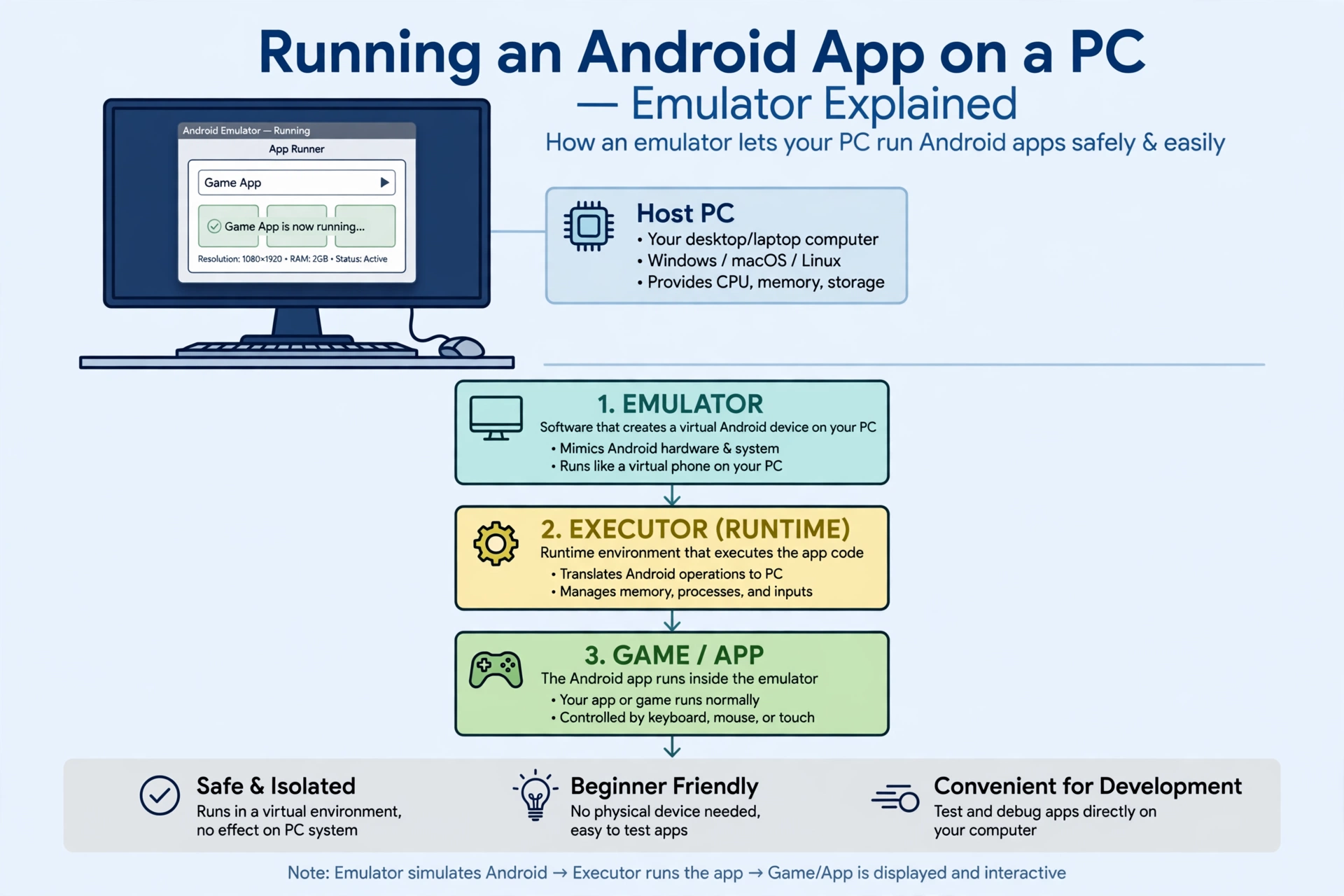
The three layers
A PC setup stacks three separate pieces of software:
- The emulator. It simulates an Android device on your computer.
- The executor. Delta runs as an app inside that emulator.
- The game client. Roblox runs inside the same emulator, and the executor attaches to it.
Each layer has its own updates, settings and failure modes. A problem in any one of them can stop the whole setup.
How to run Delta Executor on PC via emulator (conceptual steps)
These are conceptual steps, not a click-by-click tutorial. Menus, names and screens change between emulator releases, so we do not list exact buttons or version numbers.
- Step 1: Install an Android emulator on your PC. Download it from the emulator’s own official website, not from a mirror. Check that your computer meets the emulator’s published requirements, since your PC has to run both Windows and a virtual phone.
- Step 2: Install Delta inside the emulator. Community guides describe getting the Android app file and importing it into the emulator. Take it only from the developers’ official channels, because fake copies are common.
- Step 3: Install Roblox inside the same emulator. The executor and the game need to live in the same virtual device so they can interact.
- Step 4: Attach Delta to Roblox. Open the game, open the executor and follow its own on-screen process. Many guides mention a key system, which may need to be completed again after updates.
- Step 5: Run a simple script first. Start with something small. If a basic script fails, a complex one will too. Our beginner’s guide to using scripts covers the basics.
- Step 6: Check for errors. Note whether the emulator, the executor or the game is complaining. That tells you which layer to fix.
- Step 7: Test on an alt account. Never test on your main account. Everything in this setup carries risk, and a throwaway account limits the damage.
For the Windows-specific walkthrough, see our Delta Executor for Windows guide.
Delta Executor PC emulator options and what differs
Community guides and forum threads most often mention BlueStacks, LDPlayer, MuMu Player and MEmu in connection with Delta. We list them because people discuss them, not because we recommend them.
We have no independent benchmarks, and we will not invent any. Claims that one emulator is “fastest” or “most stable” for Delta are usually opinion or marketing.
When you compare one delta executor pc emulator against another, focus on these differences, not on marketing claims.
- Performance. Resource use, graphics settings and how well each emulator uses your hardware vary. Results depend on your own PC.
- Key mapping. Emulators offer ways to map keyboard and mouse to touch controls. Features and ease of use differ by emulator and version.
- Update behavior. Emulator updates can change settings or break app compatibility. Update schedules differ.
- Account and security features. Some people prefer a clean emulator profile used only for testing.
Pick based on your hardware and your tolerance for troubleshooting, and read the emulator’s own documentation.
Performance and problems with Delta Executor for PC
Most complaints about delta executor for pc setups fall into four groups.
Lag. Running an emulator, Roblox and an executor together is demanding. General emulator guides blame insufficient system resources, outdated graphics drivers and conflicting overlays or security software. One community guide suggests giving the emulator several gigabytes of RAM. That is one blog’s advice, not a tested requirement.
Keyboard and mouse mapping. Roblox on mobile expects touch input. On PC you map keys to touch zones inside the emulator. Mapping can feel awkward, and a layout that works in one game may not work in another. We found no Delta-specific mapping guidance from a reliable source.
Scripts breaking after updates. Roblox updates its client regularly, and community troubleshooting posts say executors often stop working until a matching update appears. Scripts can also break when a game changes. Our script library is a starting point, but no script is guaranteed to keep working.
Emulator updates breaking the setup. An emulator update can change how apps behave. If everything worked yesterday and fails today, check whether the emulator, Delta or Roblox updated.
When something fails, work through the layers in order: emulator, then executor, then game, then the script itself. If you want to understand why a script fails, our Lua basics tutorial helps.
The honest limits of PC play
There is no confirmed native build. We cannot point to an official Windows or Mac version of Delta, so we do not claim one. Anyone offering a “PC version” installer should be treated with suspicion.
Bans are a real risk. Roblox’s published rules treat cheating and exploiting as violations of its Terms of Use, and the consequences can include account deletion. Reports also suggest Roblox may flag emulators or modified clients. Read our guide on whether you can get banned for using Delta Executor before you try anything.
Three layers can break. The emulator, the executor and the game can each fail independently, and updates to any of them can break the chain. Plan for downtime.
“Undetected” is marketing. No website can promise that a setup will not be detected. Detection systems change, and a claim that held yesterday may not hold today. Treat any such promise as an advertisement, not evidence.
Downloads carry risk. Fake executors, keyloggers and credential-stealing pages are common around Roblox exploits. Never enter your Roblox password, cookie or verification codes into an executor site, and keep your main account away from all of this.
If your real goal is learning to script, Roblox Studio is the official tool for building and testing your own scripts.
Frequently Asked Questions
Can I run Delta Executor on PC?
Usually only through an Android emulator, because Delta is an Android-first tool. We cannot confirm an official native PC build, so we do not claim one. Any setup remains unofficial and can break.
Do I need an emulator for Delta on PC?
In the commonly discussed method, yes. The emulator provides the Android environment that Delta expects. Without one, you would need an official PC version, and we could not verify that one exists.
Which emulator is best for Delta?
We cannot name a best one, because we have no independent benchmarks. Community guides mention BlueStacks, LDPlayer, MuMu Player and MEmu. Choose based on your hardware and read each emulator’s official documentation.
Why is Delta lagging on my PC?
Lag usually comes from running an emulator, Roblox and an executor at the same time. Common causes cited in general emulator guides include limited RAM, outdated graphics drivers and background software. Closing other programs and updating drivers are the usual first checks.
Why did Delta stop working on PC after an update?
Roblox, the emulator or Delta itself probably updated, and one layer no longer matches the others. Community guides say executors often stop working until a matching update appears. Check each layer, and expect to wait if the executor is the one behind.
Can I get banned for using Delta on PC?
Yes, it is possible. Roblox’s rules treat exploiting as a violation and can lead to account deletion. Using an emulator does not remove that risk, and nobody can guarantee a setup is undetected. If you experiment, use an alt account only. Read the ban risks guide before you decide.
Related Guides
Delta Executor scripts: the full script library
Browse scripts by game and learn how finished scripts are laid out.
How to use scripts in Delta Executor (beginner’s guide)
The basics of running scripts in Delta, step by step.
Can you get banned for using Delta Executor?
The honest ban risks, alt accounts, and what moderation really means.