How to Get a Delta Executor Key
What Actually Works in 2026 (Android & iOS)
If you’ve spent any time in Roblox scripting communities, you’ve heard the same complaint over and over: “Why do I have to grind through ads every single day just to run a script?” That daily ritual is the Delta Executor key system, a mandatory 24-hour activation gate powered almost entirely by Linkvertise. Delta itself is a third-party exploit tool that injects Lua scripts into the Roblox client, and because it directly clashes with Roblox Corporation’s Terms of Service and the Byfron anti-cheat layer, you won’t find it on Google Play or Apple’s App Store. Instead, the developers keep it alive by monetizing your attention through ads, captchas, and countdown timers, handing you a time-limited key in exchange.
I’ve been using Delta on Android and iOS off and on since early 2020, and I’ve lost count of the number of times a stuck captcha or a blank Linkvertise page has wasted ten minutes of my evening. That’s exactly why I put this guide together not to sell you on the tool, but to walk you through what actually works to get your key, stay safer while doing it, and fix the most maddening errors without falling for the ocean of fake “key bypass” sites that promise hassle-free access and quietly deliver keyloggers instead. Whether you’re sideloading the IPA on an iPhone through TrollStore or running the Android APK straight from xdeltaexecutor.com, the key process remains the same frustrating dance. This article breaks it down for both operating systems, covers the daily verification logic, and gives you honest, tested troubleshooting that’s up to date as of 2026.
Delta Key System
What Is the Delta Executor Key and Why Does It Require Daily Verification?
Delta Executor won’t run without a key, and I don’t mean a one-time unlock code you paste once and forget. Every single day, you need a fresh key. They last about 24 hours, then they’re dead, whether you were actively using the executor or not. This isn’t some accidental quirk – it’s the developers’ monetization model, and it pays for the constant cat-and-mouse updates that keep Delta working after Roblox patches its anti-cheat.
The process itself usually eats up 15 to 25 minutes of your time before you even launch a game. I’ve timed it on my own Android phone over a few weeks, and on a sluggish home network it once took 33 minutes. Most people I’ve talked to in Discord servers report a similar daily grind. It’s the price of entry.
How the Delta Key System Works
24-Hour Key Expiry and Ad-Based Revenue Model
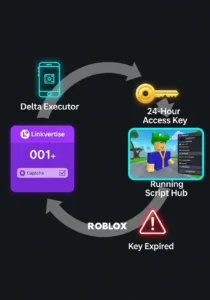
You won’t find Delta on the Google Play Store or Apple’s App Store because script executors violate Roblox’s Terms of Service. That rules out convenient in-app purchases, so the developers sell your attention to advertisers instead. When you tap “Get Key,” Delta hands you off to Linkvertise, an ad platform that pays content creators whenever someone completes a verification.
You watch ads, solve captchas, and sometimes wait through countdown timers that feel like they were designed by someone who hates you. Once you finish the whole chain, Linkvertise spits out a unique key tied to your session. That key unlocks scripts for roughly 24 hours, then you repeat the whole dance again. Day after day. It’s not a bug; it’s the business model.
Can You Use Delta Executor Without a Key?
(Official vs. “Keyless” Versions)
I see this question everywhere (Reddit threads, YouTube comments, random Discord pings). The official version absolutely requires a key. There’s no hidden toggle, no secret developer handshake.
Unofficial “keyless” Delta builds do float around, but almost all of them are third-party forks stitched together by someone who isn’t on the original development team. A keyless label doesn’t mean safer. It usually means the fork hasn’t been updated in months, and it might come bundled with whatever the uploader felt like adding. I’ve seen a “keyless” version that worked for two days, then stopped loading scripts entirely after a Roblox hotfix. Nobody was maintaining it, so it just sat there, broken.
Is Linkvertise Safe? Understanding the Ad Platform Behind the Delta Key
Linkvertise itself is a legitimate service it’s a link shortener and ad platform used by a ton of publishers. I’m not going to call it malware, because it isn’t. But the ads it serves are a different story. The specific ads you see depend on your geographic region, your device, and your browsing history.
Some of those ads redirect to extremely questionable domains. Others try to sneak notification permissions past you. The captcha and countdown screens are annoying but harmless on their own. The risk comes when you accidentally tap a misleading ad or download something you didn’t intend to. I’ve learned to keep my taps surgical only touch the clearly marked verification buttons and nothing else.
⚠️SAFETY WARNING
Key Bypass Tools and Fake Websites
⚠️ Why “Key Bypass” Tools Are Dangerous (Malware Risk)
Search for “Delta key bypass” and you’ll find a parade of sites promising to skip the whole Linkvertise headache. Most are traps, and I don’t say that lightly. Cybersecurity researchers point to key bypass tools for Roblox executors as a reliable delivery mechanism for keyloggers, trojans, and credential stealers. The bypass might actually work for a couple of hours — which is exactly how it convinces people to disable their antivirus and run the file.
Community reports in 2026 document fake bypass tools that quietly logged every keystroke, exfiltrated Roblox cookies, and even scraped saved browser passwords. When you turn off your antivirus to install any executor, you’re removing the one layer of protection specifically built to catch this kind of threat.
⚠️ How to Spot Fake Delta Executor Key Generator Websites
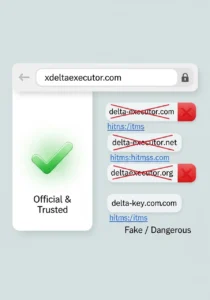
Fake key generator sites follow a pretty predictable script. They promise “unlimited keys” or “instant key generation” without any ads, which immediately screams fake because the whole point of the key system is to serve ads. The domain names are often close to the real one: delta-executor.com, delta-executor.net, deltaexecutor.org, delta-key.com. The actual official source is xdeltaexecutor.com. That’s it.
Other red flags: a site that asks you to download a separate “key generator” executable, or any page that demands your Roblox username and password to “verify your account.” Delta keys are temporary by design, and no website can change that, no matter what it claims.
⚠️ Official Delta Executor Sources
I’ll keep this simple. The one and only download source for Delta Executor on Android is xdeltaexecutor.com. Scamadviser gives that domain a trust score around 82, which reflects mixed user feedback and a hidden WHOIS identity not a glowing endorsement, but it’s the real deal. Every alternative domain is a bigger gamble.
For iOS users, the official key system is accessed through xdeltaexecutor.com. I wouldn’t trust a YouTube comment link, a Discord direct message, or a Mediafire upload claiming to be Delta. Stick to those two domains, and even then, keep your guard up.
⚠️ What Happens When You Download from Untrusted Sources (Data Theft, Keyloggers)
The nightmare scenario isn’t just a broken executor that refuses to launch it’s a compromised device that you don’t even realize is infected. Keyloggers hidden inside fake Delta installers can capture every password you type, including Roblox credentials, email logins, and even saved payment details if you’ve ever bought Robux on that device.
I’ve seen multiple reports in Roblox communities from people who needed a full factory reset to clear persistent issues after installing a shady executor. These aren’t rare edge cases. They’re a steady drumbeat across Android/VNG, iOS, and Windows user forums. The ecosystem of fake Delta sites and malicious forks is the single biggest risk associated with this tool, and most “key guides” barely mention it.
Android Users
Step-by-Step Delta Key Guide
Delta Key System Requirements for Android (OS 5.0+, 1GB RAM, OpenGL ES 3.0)
Delta Executor runs on Android 5.0 and above, but you’ll have a much smoother time on Android 7.0 or higher. Most current APK builds want at least 1GB of RAM and OpenGL ES 3.0 support for the script injection to work without crashing. The APK itself is usually between 15 and 30MB, depending on which version you grab.
Before you install, you’ll need to allow installation from unknown sources. Your phone blocks APKs from outside the Play Store by default. Go to Settings > Security > Install from Unknown Sources and toggle it on for your browser or file manager. Without this, the installation just fails quietly.
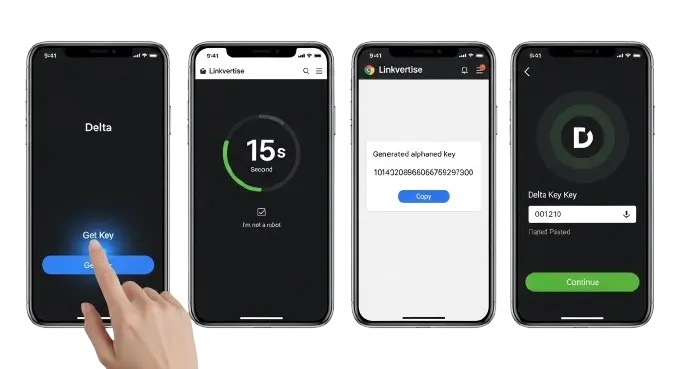
Step 1: Launch Delta Executor and Tap “Get Key” / “Receive Key”
Open Delta after the install finishes. The main screen stares back at you with a text field waiting for an access key. Below that, there’s a button labeled “Get Key” or “Receive Key.” Tap it. The app copies a Linkvertise URL to your clipboard automatically in most cases. Don’t close Delta yet — you’ll circle back once you’ve got the key.
Step 2: Copy the Linkvertise URL to Your Clipboard
If the app didn’t auto-copy the link, you can grab it manually from the prompt. The URL always starts with “linkvertise.com” followed by a string of numbers. Keep that link handy because you’re about to paste it into a browser.
Step 3: Open Chrome/Browser and Paste the Link
Fire up Chrome (or whatever browser you normally use on your Android) and paste the Linkvertise URL into the address bar. Hit go and give the page a few seconds to load. If you’re staring at a blank white screen, don’t panic that’s a common headache, and we’ll deal with it in the troubleshooting section.
Step 4: Complete the Linkvertise Verification (Ad, Captcha, Timer)
This is the part that makes people want to throw their phone across the room. Linkvertise walks you through a gauntlet: a countdown that feels interminable, a captcha where you click crosswalks until your soul leaves your body, and maybe a short ad view. Follow each step exactly. Don’t close the page early. Don’t click anything that isn’t obviously part of the verification. Wait until that green “Continue” button lights up fully, then tap it. Rushing this almost always triggers a reset, and you’ll have to start the whole chain again.
Step 5: Copy the Generated Key and Return to Delta
Once the verification steps are done, Linkvertise shows a unique key string — usually a jumble of letters and numbers. Hit the copy button, then switch straight back to Delta Executor. Make sure you grab every character. If even one letter gets cut off, the key won’t validate.
Step 6: Paste Your Key and Tap “Continue”
Paste the key into Delta’s text field and tap “Continue” or “Submit.” If the key is valid, the script hub unlocks, and you can finally start loading and executing scripts. Celebrate briefly. Then remember: this key is dead in about 24 hours, and you’ll be back here tomorrow repeating the whole ritual.
For iOS Users
Step-by-Step Delta Key Guide
Delta Key Requirements for iPhone/iPad (No Jailbreak Required, iOS 12.0+)
The actual key generation process on iOS is almost identical to Android, right down to the Linkvertise song and dance. The big difference is how you get the app installed in the first place.
Delta on iOS works without a jailbreak, which is a relief. You need iOS 12.0 or later and a way to sideload the IPA file. The three go-to methods are TrollStore, AltStore, and Sideloadly. TrollStore is the most stable option if your iOS version supports it, because it doesn’t require weekly re-signing. AltStore needs a companion app running on your computer and demands you refresh the app every seven days, which gets old fast.
Step 1: Install Delta Executor via TrollStore, AltStore, or Sideloadly
Grab the Delta IPA from the official source. With TrollStore, you just open the IPA file directly and install. For AltStore, connect your iPhone to a machine running AltServer, then sideload the IPA through the AltStore app on your phone. Sideloadly works similarly but requires a USB connection every time you install or refresh.
After installation, navigate to Settings > General > VPN & Device Management and trust the developer certificate. Skip this step, and iOS will block Delta from opening with a faceless error message.
Step 2: Launch the App and Tap “Receive Key”
Open Delta from your home screen. The interface mirrors the Android version closely. Tap “Receive Key” and the app copies a Linkvertise URL to your clipboard.
Step 3: Use Safari Browser for Linkvertise (Paste and Go)
Stick with Safari for the key process third-party browsers on iOS tend to trip over Linkvertise’s redirect chain and pop-up requirements. Paste the URL and go. If Safari blocks pop-ups by default (which it does on newer iOS versions), you might need to temporarily allow them in Settings > Safari > Block Pop-ups.
Step 4: Complete the iOS Key System Tasks (Similar to Android)
The verification flow is the same tedious parade: countdown, captcha, ad engagement, wait for the green button. Some iOS users claim they get fewer aggressive redirects than Android users, but that varies wildly by region and session. Just grind through the steps and don’t close the page early.
Step 5: Copy the Key and Return to Delta iOS
Copy the full key string and jump back to Delta. Double-check the entire key before switching apps iOS clipboard handling can occasionally trim trailing characters.
Step 6: Enter Key and Unlock Script Execution
Paste the key and tap continue. If Delta accepts it, the script hub appears. You’re in. Now the clock is ticking you’ve got roughly a day before this key expires and you’re back at square one.
Delta Key Troubleshooting & Fix Common Problems
Linkvertise Ad Not Loading? Fix for Stuck Loading Screen
A blank white page on Linkvertise usually points to one of three culprits: an ad blocker interfering, corrupted browser cache, or your network blocking the ad server. Start by disabling any ad-blocking extensions. Then clear your browser’s cache and cookies. After that, try flipping from Wi-Fi to mobile data or vice versa this solves a surprising number of stubborn loading issues.
Some regular users I’ve compared notes with swear by Opera Mini with its data saving set to “High” (and ad blocking turned off) as more reliable than Chrome for Linkvertise pages, especially on lower-end devices or spotty connections.
How to Fix “Invalid Visit Detected” on Linkvertise (VPN, Mobile Data Switch)
The “Invalid Visit Detected” error means Linkvertise has flagged your session as suspicious. VPNs are the number one trigger. So are ad blockers and certain browser privacy settings. Try these fixes in order: turn off your VPN, switch from Wi-Fi to mobile data (or back), disable every browser extension temporarily, and refresh the page. If nothing works, swap browsers entirely. Opera Mini on Android has a solid track record for dodging this specific error.
“Invalid Key” or “Key Not Working” What to Do When Your Key Fails
Nothing stings quite like grinding through the ad gauntlet only to get slapped with “Invalid Key.” First, check for extra spaces at the start or end of your pasted key. The copy action from Linkvertise sometimes grabs invisible whitespace. Delete anything that isn’t a letter or number, then try again.
If the key still fails, you probably spent too long between generating the key and pasting it. The activation window is tight. Speed through the verification and paste as quickly as you can. In rare cases, the key may have already been claimed by another session. Generate a fresh one and try again.
Delta Key Expired — Why Keys Expire Every 24 Hours and How to Renew
Keys expire by design there’s no magic setting to stretch them. Once the 24-hour window closes, Delta locks script execution until you complete a new Linkvertise verification. This even happens mid-session if you were in a game when the timer ran out and then closed the app.
The only fix is generating a new key via the standard process. Budget 15 to 20 minutes before your next session. If you know you’ll play tomorrow, it helps to plan the key generation around it rather than scrambling at the last minute.
Linkvertise Loop Fix When “Continue” Button Won’t Turn Green
The green “Continue” button staying stubbornly gray usually means Linkvertise didn’t register a completed step, often after a captcha. Refresh the page and redo the captcha. If you’re stuck in a loop where the same steps repeat endlessly, clear your browser data and try again with a fresh paste of the Linkvertise URL. Some people fix this instantly by switching browsers mid-process.
Cloudflare Verification Stuck? How to Bypass the Security Check
Delta-related pages sometimes trigger a Cloudflare challenge — that “checking your browser” screen that spins for a few seconds. If it loops endlessly, try disabling your VPN, clearing cookies, or swapping to a different network. Usually the check passes within 10 seconds on a clean browser with no VPN.
Browser Ad Blocker Causing Issues? Disable Extensions Temporarily
Ad blockers are the single most common cause of Linkvertise failures. The platform needs to load and track ad interactions to generate your key. With an ad blocker active, it can’t verify anything, and the whole verification chain breaks down. Disable uBlock Origin, AdBlock Plus, or whatever you’re running for the duration of the key process. Turn it back on the moment you’ve got your key. On mobile, also check for any system-wide ad-blocking DNS services you might have enabled.
Delta Key Not Copying Properly? Check for Extra Spaces
This tiny detail has wasted more of my time than I care to admit. When you copy a key from Linkvertise, leading or trailing spaces sometimes hitch a ride. Paste the key into a notes app first and inspect it. Remove any whitespace before the first character and after the last character. Then copy the cleaned key and paste it into Delta. A five-second check saves redoing the whole verification.
Advanced Questions About the Delta Key System
Delta Executor vs Competitors Key System Comparison
Delta Executor (Daily Ad Key) | Arceus X NEO is the biggest name among keyless mobile executors. No ads. No Linkvertise. No daily ritual. You install it, open it, and execute scripts immediately. Built by the SPDM Team, it runs on Android, iOS, and PC with a built-in mod menu for easy access. The trade-off is script compatibility. Delta’s library is larger and updated more aggressively. Arceus X NEO supports fewer complex scripts and has a smaller community hub. If all you need are basic auto-farm or ESP scripts and the daily grind makes you miserable, Arceus X NEO is the cleaner choice. If your scripts only run on Delta, the key system is the price of admission. |
Delta Executor | Solara is a PC-only executor that’s completely keyless. With over 2 million downloads, it’s the go-to recommendation for desktop users who want to skip the ad dance entirely. No surveys. No timers. Just download and run. Its UNC score (script compatibility rating) runs lower than Delta’s on supported platforms, so some of the more ambitious scripts won’t work. For everyday tasks like auto-farming and teleportation, though, Solara handles the job without asking for 20 minutes of your life first. |
Delta Executor | Hydrogen is one of the few free executors that works on macOS, in addition to Android and Windows. It uses a Linkvertise key system nearly identical to Delta’s, so you’re not dodging the ad grind by switching. If you’re on a MacBook and need a free executor, Hydrogen is your realistic option despite the key system. On Android and Windows, Delta generally beats it on script compatibility and update frequency. |
Executive Summary: Which Executor Has the Best Key System for Your Needs?
This really comes down to what you value more: your time or script variety. If you want to open an app and start scripting in seconds, go keyless. Arceus X NEO on mobile, Solara on PC. Neither demands a daily ad commitment. If you need Delta’s specific script library and are okay with feeding it 15 to 25 minutes of ad engagement every day, then the key system is just the cost of doing business.
I’ve seen people script heavily and treat the daily key process as background busywork — they start the verification while making coffee. If you’re only dipping in for a quick 30-minute session, though, spending 20 minutes on ads first feels like the world’s worst time investment. Pick your tool based on how much you actually plan to script.
Pro Tips for a Smooth Delta Key Experience
Best Browsers for Linkvertise on Android and iOS (Chrome, Safari, Opera Mini)
Chrome handles Linkvertise fine on most Android devices, but Opera Mini with data saving on “High” and ad blocking turned off has a better track record for dodging the “Invalid Visit” error. On iOS, stick to Safari — third-party iOS browsers sometimes choke on the redirect chain. If one browser gives you grief, swap to another before you start troubleshooting your network. Often enough, a simple browser switch fixes the problem in under a minute.
Should You Use a VPN When Getting Your Delta Key?
In my experience, no. VPNs are one of the most reliable ways to get flagged by Linkvertise’s anti-abuse checks. If you absolutely need a VPN, expect more verification steps and occasional blocks. For the smoothest path, generate your key on a clean home network without a VPN running.
How to Pre-Open Linkvertise Pages to Save Time
Here’s a small workflow trick that shaves a few minutes off the daily grind. Open your browser and paste the Linkvertise URL before you even launch Delta. Start the verification while Delta loads in the background. By the time Delta finishes its startup checks, you’re already past the countdown and halfway through the captcha. This overlaps the waiting periods and cuts total key time noticeably
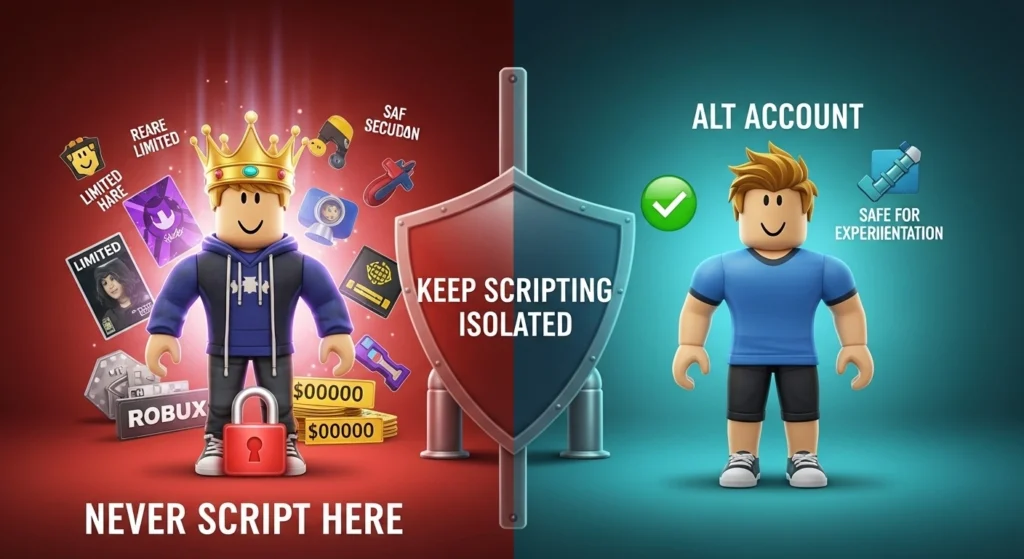
Using an Alternate Roblox Account Why You Should Never Script on Your Main
This advice isn’t directly about the key system, but it’s the most important thing in this entire guide. Script execution violates Roblox’s Terms of Service. Roblox has seriously beefed up its anti-cheat with the Byfron client integration, and it detects script injection patterns specifically. Roblox itself can issue temporary suspensions or permanent account terminations, and individual games often run their own anti-cheat that permanently bans accounts from that game.
Delta’s anti-ban feature reduces detection risk in some situations, but it doesn’t make you invisible. Every Roblox security update opens a detection window until Delta releases a matching patch, and that gap can last several days. During that window, every session carries full exposure. Use an alternate account. Never your main. Never an account holding rare items, large Robux balances, or years of progress. The risk simply isn’t worth it.