

Delta Executor iOS: IPA Status, Sideloading Steps and Risks for iPhone and iPad
Unofficial IPA builds only. There is no official Delta Executor on the App Store.
No, there is no official Delta Executor iOS. Delta Executor is not on the App Store, and any “Delta Executor iOS” file you come across is either a fake, a sideloaded IPA, or an unofficial port. Apple’s rules block apps that change how other apps behave, so an official release is not something you can simply download.
That does not stop the name from appearing on a lot of download pages, and this is where most of the risk comes from. This page explains what an unofficial IPA actually is, why many of them are unsafe, what sideloading involves, what can go wrong, and which rules apply to Roblox executors on iPhone and iPad. Nothing here is an endorsement of any unofficial build.
What is Delta Executor iOS?
Delta Executor is a third-party tool designed to run custom Lua scripts inside Roblox. On Windows and Android, it has a decent reputation for speed and script compatibility. The iOS version is where things get messy.
Is Delta Executor available for iOS?
The short answer: not officially, and not easily. There is no Delta Executor on the App Store. Apple’s policies block any app that modifies another app’s behavior. So any “Delta Executor iOS” you see advertised is either a fake, a sideloaded IPA file, or an unofficial port.
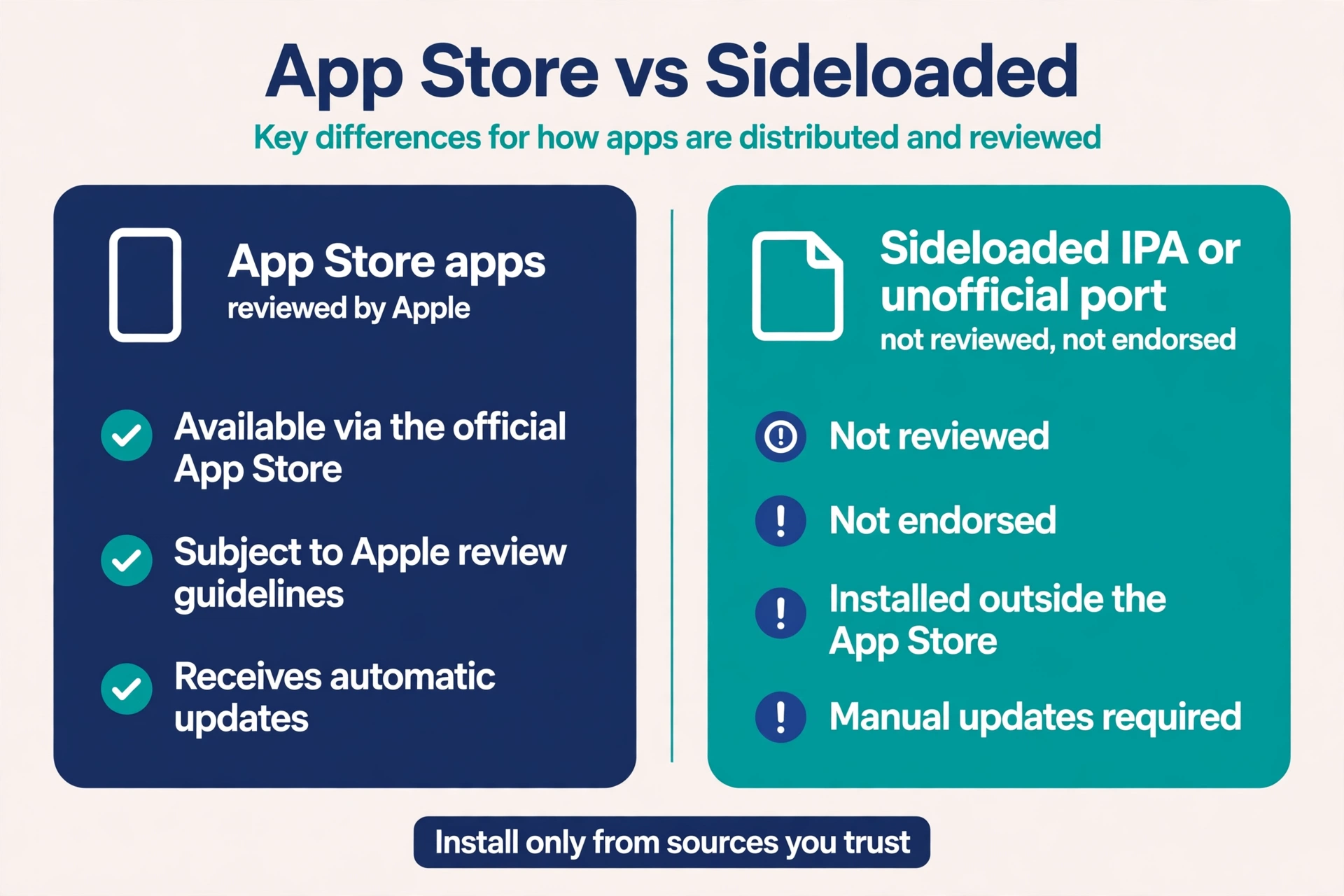
Some developers have created IPA versions that you can install using sideloading tools. But these are not endorsed by the original Delta team. And many of them contain malware. I’ll show you how to spot the fakes.
What is Delta iOS Installer?
You might see a file called “Delta iOS Installer” or “Delta.ipa” floating around. That’s not an official product. It’s usually a modified version of the Android executor repackaged for iOS. Some work, most don’t. And the ones that work stop working after seven days unless you have a paid developer certificate.
Main Features of Delta Executor on iOS
Assuming you find a legitimate IPA (which is rare), the features tend to mirror the Android version but with worse stability.
Script Execution Speed and Stability
On Android, Delta runs scripts quickly. On iOS, expect lag. The sideloading process adds overhead, and Roblox’s iOS client has tighter memory restrictions. Scripts that work fine on a PC will freeze or crash on an iPhone within minutes.
Supported Lua Functions and Libraries
The iOS port typically supports basic Lua functions (print, wait, game, workspace) and common libraries like Krnl or Synapse X clones. But advanced functions especially those that hook into Roblox’s renderer often fail. You won’t get full library support.
User Interface Overview on iPhone and iPad
When it does load, the UI is cramped. Buttons overlap on an iPhone SE. On an iPad, the interface scales poorly. Most users report that the script hub barely fits on screen. Not exactly a premium experience.
Does Delta Executor work on iPads?
Yes, in theory. If you sideload the IPA onto an iPad, it may launch, but stability varies by iOS version and port. But the interface isn’t optimized for larger screens. Buttons might be misaligned. And performance is actually worse than on an iPhone because iPads push higher resolutions.
So manage expectations.
Is Delta Executor Safe to Use on iOS?
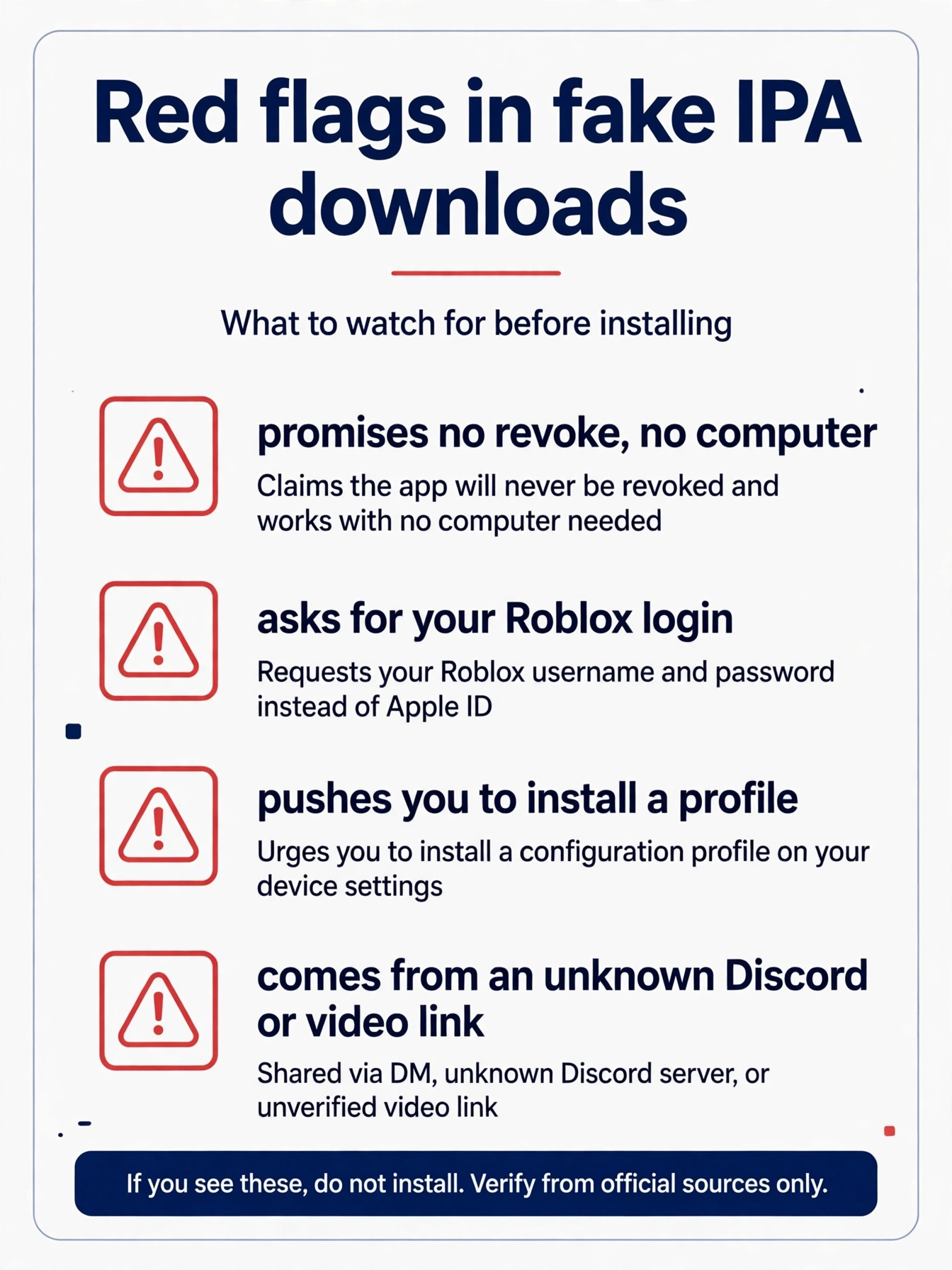
Treat any Delta Executor iOS download as unsafe until proven otherwise. There is no official iOS release to compare a file against, so you have no reliable way to confirm what an IPA really contains. Fake IPA files are a common way to steal Roblox login data, install unwanted configuration profiles, or collect personal information. Sideloaded apps also skip the App Store review process, so the risk sits with you. On top of that, Roblox can ban accounts that use executors, which is covered in the next section.
Risks of Using Third-Party Roblox Executors
Roblox’s Terms of Use explicitly forbid any third-party tool that interacts with the client to gain an unfair advantage. Using a script executor can get your account banned-sometimes permanently. Roblox has automated systems that detect injected code. They don’t always catch you immediately, but when they do, it’s usually a termination, not a warning.
Beyond bans, there’s the security risk. Sideloaded apps run outside Apple’s sandbox protections. A malicious IPA can access your photos, contacts, and even keychain data.
How to Avoid Malware and Data Theft
Stick to these rules if you absolutely must try an executor on iOS:
- Never download from random YouTube videos or Discord DMs.
- Only use IPAs from communities with verified file hashes (like GitHub releases with GPG signatures).
- Run the IPA through a virus scanner like VirusTotal before sideloading.
- Use a secondary Apple ID that has no payment info or personal data.
Better yet, don’t use iOS executors at all. Run scripts on a Windows PC or an Android device that you don’t care about. The iPhone is not built for this.
How to Download Delta Executor for iOS (iPhone and iPad)
Below is the general sideloading flow that people describe for unofficial IPA files. It is not an official or verified install method for Delta Executor iOS, and results vary by file, device and iOS version. Apps signed with a free certificate can stop opening after a short time and may need to be reinstalled or refreshed. For a general comparison of sideloading methods and the revoke cycle, see our Delta Executor iOS sideload guide.
- Open Safari on your iPhone.
- Find a Delta.ipa file from a trusted source
- Download it to a computer or directly on your iPhone.
- Use a sideloading tool like AltStore, SideStore, or ESign to install the IPA.
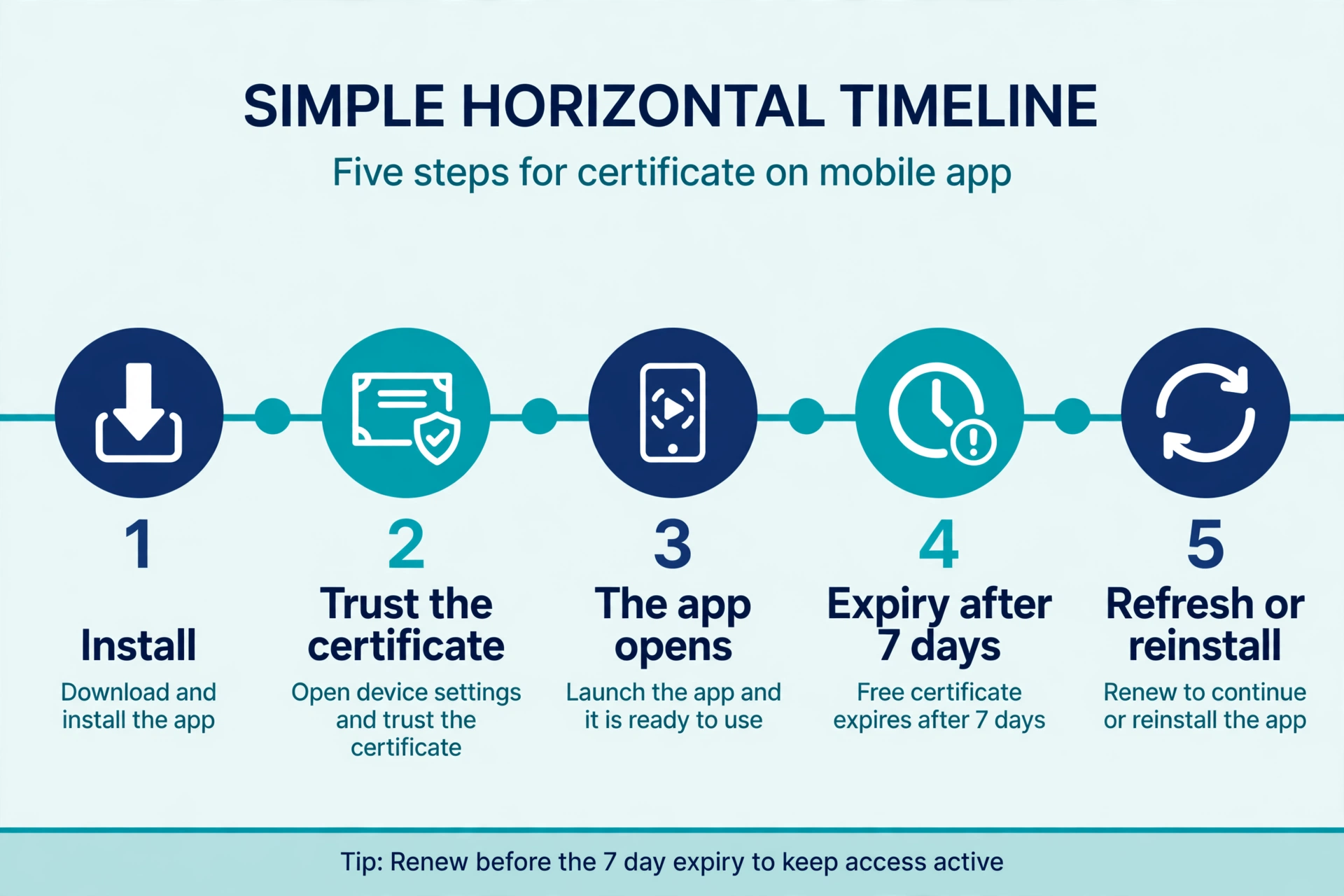
- Trust the developer certificate in Settings > General > VPN & Device Management.
Even if these steps complete, the app may not open or work as described, and the file itself may be unsafe. Only go further if you fully understand the risks.
Other Methods to Download Sideload IPA using ESign or Scarlet App
The options below are other tools people use to sign and install unofficial IPA files. None of them makes an unofficial file safe, and none is an endorsed route for Delta Executor.
Scarlet:
Install Scarlet first (Google “usescarlet” for instructions Scarlet has its own certificate drama). Then download the Delta IPA from the siteand import it into Scarlet.
ESign:
Similar deal. ESign lets you sign the IPA with your own certificate if you have one. This is more stable because you’re not sharing a public certificate with 50,000 other people.
AltStore (requires a computer):
AltStore uses a computer running AltServer to install and refresh apps on your iPhone. Apps signed with a free certificate need to be refreshed every 7 days, which can happen over Wi-Fi if the computer is on. As with every method here, the IPA file itself may be unsafe.
Stop Downloading Fake Delta IPA Files and Untrusted Installers
I can’t tell you how many people have messaged me saying “I downloaded Delta iOS from [some sketchy site] and now my phone is acting weird.” The fake IPAs are everywhere. They use the Delta name, sometimes even copy the logo. But inside, it’s just a wrapper with spyware.
If a website promises “free Delta iOS no revoke, no computer,” it’s lying. There’s no free lunch here.
The Critical Final Step: Trusting the Developer Certificate
After sideloading, iOS will block the app from opening. You have to go to Settings > General > VPN & Device Management, find the profile associated with the sideloaded app, and tap “Trust.” This is the moment of no return. Once you trust a certificate, that app can do almost anything on your phone.
How to Update Delta Executor on iOS
Updates are manual and annoying. There’s no auto-update because the app isn’t on the App Store. Check the Delta Executor status page for current information.
Checking for the Latest IPA Version
You have to go back to whatever forum or Discord server you originally downloaded from, look for a new IPA version number, and download it. Most “updates” are just repackaged old versions with a new date. Check the file hash.
Reinstalling After an Update
Delete the old app, install the new IPA, trust the certificate again. Your scripts and settings will be wiped. There’s no data persistence unless you manually back up the app’s container, which requires a jailbreak.
Delta Executor iOS Not Working: Common Errors and Fixes
“Untrusted Developer” Error Fix
This happens when you didn’t trust the certificate. Go back to Settings > General > VPN & Device Management and find the profile. Tap Trust. If the profile isn’t there, the sideloading failed or the IPA was signed improperly. For the full fix, see the iOS untrusted developer guide.
App Crashes on Launch – Solutions
Crashes on launch usually mean the IPA is incompatible with your iOS version. Delta iOS ports vary in the iOS versions they need. On newer iOS versions, crashes are common. Also, try rebooting your phone or reinstalling the IPA with a different sideloading tool.
Sideloading Expiry and How to Refresh
Free Apple Developer accounts only keep sideloaded apps alive for 7 days. After that, the app won’t open. You need to reconnect your iPhone to your computer (or use a tool like AltStore’s refresh feature) to re-sign the app. Some users automate this with a local server, but that’s advanced.
How to Use Delta Executor on iOS – Step by Step
There is no verified, official way to run Delta Executor on iOS, so the steps below describe the general flow that unofficial builds are reported to follow. They are not a tested or endorsed method. Many builds fail to attach to Roblox at all, and running scripts can lead to an account ban. If you continue despite the risks, never use your main Roblox account.
- Open Delta Executor while Roblox is running in the background.
- Tap the script hub or paste your Lua script into the editor.
- Press Execute or Inject.
Injecting Scripts into Roblox
Most Delta iOS versions have an “Attach” button that tries to find the Roblox process. If it succeeds, you’ll see a green indicator. Then you can run your script. But on iOS, the attach step often fails. You might need to restart Roblox and the executor multiple times.
If nothing happens, the script is probably outdated or you’re in the wrong game.
What Increases Ban Risk
If you use scripts, these raise the risk:
- Obvious griefing scripts (fly, noclip, kill all) in public servers get reported.
- Using scripts on a main account puts that account at risk.
- Scripts that inject every single second are easier to detect.
- Auto-farming scripts that run for hours leave input patterns Roblox logs.
Even then, no method is safe. Roblox’s Byfron anti-tamper system (now on PC) hasn’t fully rolled out to iOS yet, but it will eventually.
Alternatives to Delta Executor for iOS
Delta isn’t the only game in town. When it’s down (and it will be down), here are your options: For iOS-specific options, see Delta Executor alternatives for iOS.
- Arceus X NEO: Keyless, works on iOS, sometimes more stable.
- Codex Executor: Good for specific games like Fisch or Blox Fruits.
- Hydrogen: Mac-focused, but has an iOS variant that’s worth a look.
If you use a Mac instead of an iPhone, Delta Executor for Mac is offered through the Delta Installer.
For Android users, the situation is better. You can check Delta Executor vs competitors for a comparison.
Delta Executor iOS vs. Android – Key Differences
| Feature | Delta iOS | Delta Android |
|---|---|---|
| Installation | IPA sideloading, certificate trust, constant revocations | Download APK, toggle “Unknown Sources,” done |
| Stability | Terrible. You’ll reinstall every few days. | Mostly fine. APKs aren’t subject to Apple’s walled garden. |
| Performance | Decent, with gesture support | Comparable, but fewer OS restrictions |
| Key System | Same ad-based annoyance | Same ad-based annoyance |
Android is the better choice if you have the option. The iOS version exists mostly because people want it to exist, not because it works well.
Legal and Policy Concerns for Roblox Executors on iOS
Roblox’s Terms of Service Section 9 prohibits “cheating, exploiting, or automating access.” Using Delta Executor violates that. Apple’s Developer Program License Agreement also forbids apps that “install or run executable code not signed by Apple.” Sideloading an IPA for the purpose of exploiting breaks both.
If you get caught, Roblox will terminate your account and Apple won’t help you.
For more information about how we approach third-party tools and user safety, you can read our Terms and Conditions, Privacy Policy, and Disclaimer. If you have questions about script executors in general, check our Delta Executor scripts page or visit our Discord server for community discussions.
Final Thoughts
There is no official Delta Executor for iOS, and unofficial IPA builds come with real downsides: fake files and malware, apps that crash or stop opening, and a risk of Roblox account bans. Many people are curious about running scripts on a phone, but the trade-off is poor for most users. If you still want to try, use a secondary Apple ID, back up your data first, and never trust a random download. Otherwise, keeping script experiments off your main iPhone is the safer choice.
If you still want to try, use a burner Apple ID, back up your data first, and never trust a random download. Or do the smart thing: stick to Windows or Android for script execution and keep your iPhone clean.
For official Delta Executor downloads on other platforms, visit the Windows version page or APK page. iOS users looking for a Delta key should be aware that keys are not required for iOS-another sign that most iOS versions are unofficial.