

“Unexpected Symbol” Near … – Roblox Lua Error Explained
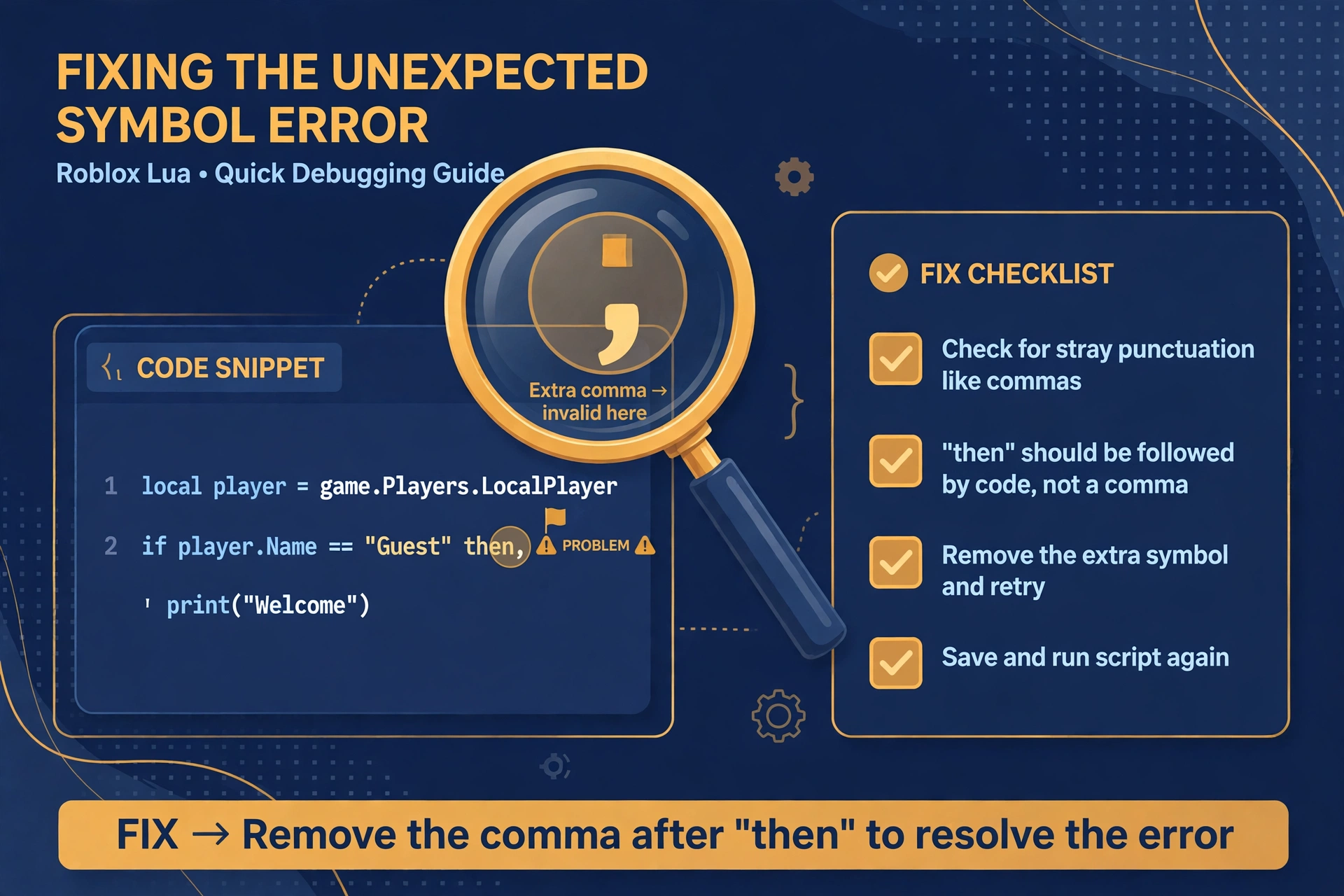
If you have ever seen “unexpected symbol near” followed by a character in your Roblox output, you have met one of the most common Lua syntax errors. It looks cryptic, but it almost always comes down to one small slip. This guide explains what it means and how to track it down, step by step. If you want a quick unexpected symbol roblox lua fix, start with the table below.
Quick Answers
| Question | Short answer |
|---|---|
| What does “unexpected symbol” mean? | Lua’s parser hit a character it did not expect at that point and stopped reading. |
| Most common cause? | A missing comma, bracket, quote, or a typo in a keyword just before the flagged spot. |
| First thing to check? | The line named in the message, then the line directly above it. |
| Is the executor to blame? | Almost never. It is a syntax problem inside the script text itself. |
What the error is really saying
Lua reads your script from top to bottom, one piece at a time. Each piece must fit the grammar of the language.
When it reaches something that does not fit, it stops and reports an unexpected symbol near error. The message names the character it choked on.
That character is the place where Lua noticed the problem. It is not always where the problem started.
Think of it like reading a sentence with a missing word. You only realize something is wrong when the next word makes no sense.
So the real mistake is often just before the flagged symbol. Keep that in mind and the error becomes much easier to trace.
The 6 most common causes
Any roblox lua syntax error fix starts with knowing the usual suspects. Here are the six that cause most cases.
1. A missing comma or bracket
Lists, tables, and function calls need commas and matching brackets. Forget one and the next item looks out of place.
A tiny generic example of a missing comma between two list items:
local items = { "apple" "pear" }Lua sees the second string right after the first and flags it as unexpected.
2. A typo in a keyword
Words like function, then, end, and local must be spelled exactly. One wrong letter turns a keyword into an unknown name, and the next symbol no longer fits.
3. A string left unclosed
If an opening quote has no matching closing quote, Lua keeps reading everything after it as text. The error then appears much later, often on a line that looks perfectly fine.
4. A symbol pasted from another source
Text copied from websites, chats, or documents can carry curly quotes, odd dashes, or invisible characters. They look normal to you but are not valid Lua symbols.
5. A block closed too early
Every if, for, while, and function needs its own end. An extra end, or one in the wrong spot, leaves the following code stranded outside any block.
6. A reserved word used as a name
Words such as end, function, or repeat belong to the language. Using one as a variable name confuses the parser immediately.
How to read the error message
A typical message has three parts: the line number, the problem type, and the symbol it names. Each one gives you a clue.
The symbol named in the message. This is the character Lua could not accept. Search for it on the reported line.
The line number. This tells you where the parser gave up. Start there, but do not stop there.
Why the line can still mislead. The parser only fails when something stops making sense. A mistake earlier can travel forward before it breaks anything.
Check the line above first. Before changing anything on the flagged line, read the line directly above it. Look for a missing comma, a missing closing bracket, or an open quote.
If the line above looks clean, work backward a few lines. Unclosed strings and brackets can hide further up than you expect.
Fix it step by step: an unexpected symbol Roblox Lua fix
Follow this order for a reliable unexpected symbol roblox lua fix.
- Step 1: Back up the script. Save a copy before you change anything. If a fix goes wrong, you can return to a clean starting point.
- Step 2: Fix one symbol at a time. Change a single thing, then stop. Several edits at once make it impossible to know which one helped.
- Step 3: Re-check after each fix. Run the script through a checker again. The error may disappear, or it may move to a new spot, which is useful information.
- Step 4: Use the Lua validator to point at the line. The Lua validator reads your script text and highlights where the syntax breaks. It points you to the area to inspect, which saves time compared with scanning by eye.
- Step 5: Do not paste random fixes from comments. Replies under videos and posts are often guesses. A fix that worked for someone else’s script may break yours.
If any of these terms feel unfamiliar, the Lua basics guide covers brackets, blocks, and keywords in plain language.
When it is not a typo
Sometimes you can read every line and still find nothing wrong. In that case, the problem may be outside your own typing.
A copied script with pieces missing. If a script was cut off when copied, it may start or end mid-block. The parser then hits an ending it cannot make sense of. Compare the full text to its source and make sure nothing was lost.
A file saved in the wrong encoding. In general terms, some editors save text in formats that add hidden characters at the start or inside lines. These do not show on screen but still confuse the parser. Re-saving the file as plain text often clears it.
A comment marker problem. Comments in Lua use specific markers. A comment that is opened but never closed, or a marker typed slightly wrong, can swallow real code or leave stray characters behind. Check that every comment starts and ends the way Lua expects.
If you work with ready-made scripts often, the script library pillar explains how to approach them with care and what to look at before running anything.
FAQ
Does this error mean my script is broken?
Not necessarily, because it usually means one small piece of syntax is wrong. The rest of the script may be fine. Fix the flagged spot and the surrounding code often works as intended.
Why does it point at a symbol I did not type?
It points there because that is where Lua stopped understanding the text. The symbol may come from a pasted source, or it may be where an earlier mistake finally caused a conflict. Check the line above and look for hidden characters.
Can the validator fix it for me?
No, the validator shows you where to look but does not rewrite your script. You still decide what the correct text should be. It simply narrows the search so you spend less time guessing.
Is it an executor problem?
Almost always no, since this is a syntax error in the script text itself. The same mistake would fail in any Lua environment. Fixing the script is the right place to start.
What if fixing one symbol gives a new error?
That is normal and often a good sign. Lua stops at the first problem it finds, so fixing it lets the parser move forward and reveal the next one. Keep fixing one issue at a time until the messages stop.
Should I rewrite the whole script?
Rarely. A full rewrite takes longer and can add new mistakes. It is better to fix the flagged areas one by one, and only start fresh if the script is badly damaged or incomplete.
Quick recap
- The symbol in the message is where Lua noticed the problem, not always where it began.
- Check the flagged line, then the line above it.
- Look for missing commas, unclosed quotes, extra end words, and pasted characters.
- Back up, fix one thing at a time, and re-check after each change.
- Use a validator to narrow down the line before editing.
With a steady, one-fix-at-a-time approach, most syntax errors are quick to resolve.
Related Guides
- Lua validator – check your script text and find the line where the syntax breaks
- Roblox Lua scripting basics – learn the core rules behind blocks, brackets, and keywords
- Delta Executor script library – the main hub for script guides and troubleshooting