

Where to Download Delta Executor Safely (Official vs Fakes)
If you are searching for where to download Delta Executor, you will find dozens of sites that all call themselves official. They cannot all be right. This guide shows how to tell a legitimate source from a fake using checks you can run yourself.
Last reviewed: October 2026
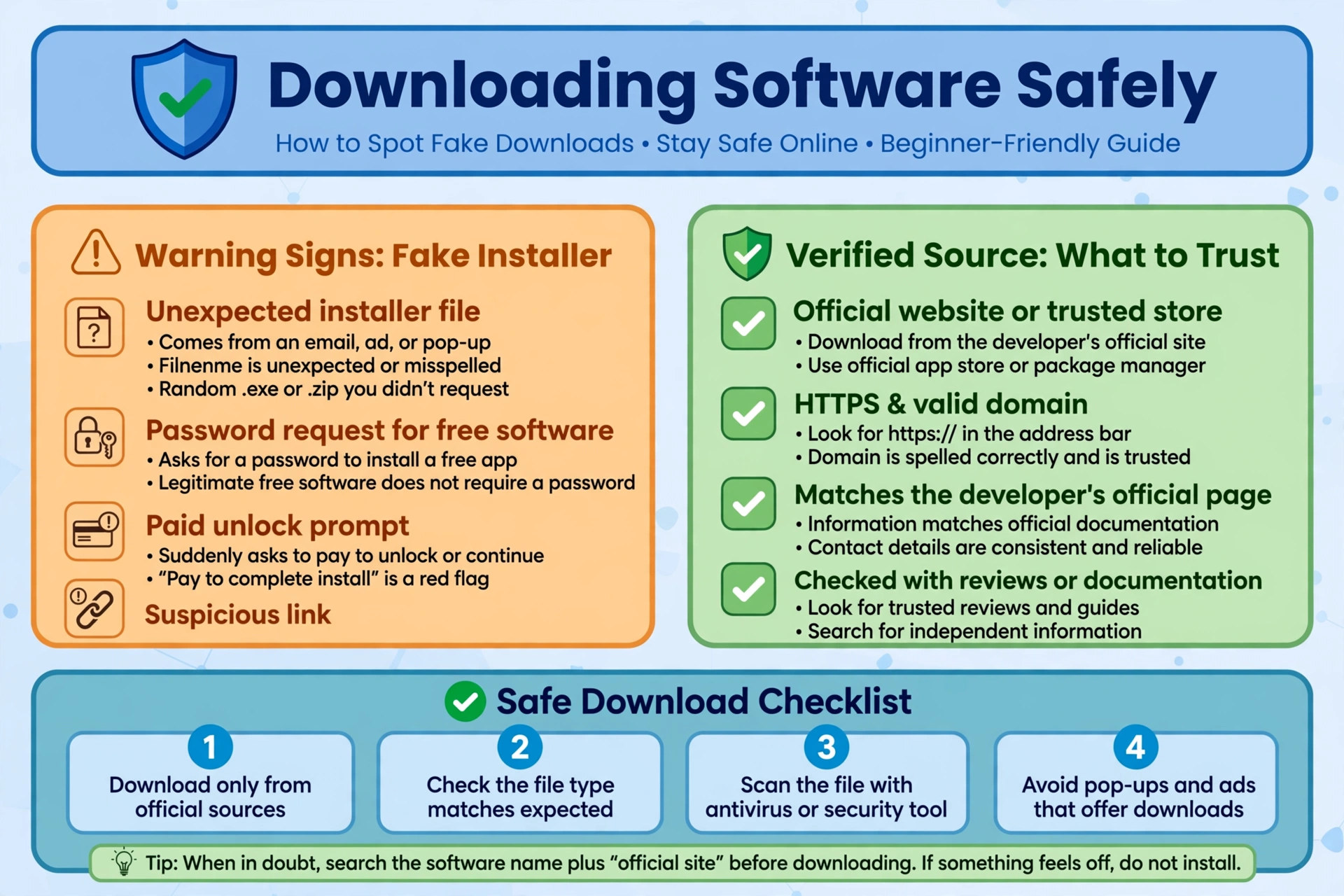
Quick Answers
| Question | Short answer |
|---|---|
| Where can I download Delta Executor? | From the source the developers themselves point to, confirmed in more than one independent place. A site calling itself “the only official site” is not proof. |
| How do I know a download is official? | The source matches what the developers say elsewhere, uses HTTPS, asks for no passwords or cookies, and the community cross-checks it. |
| How do I spot a fake? | Unexpected .exe files, requests for Roblox login details, paid unlocks, sellers in direct messages, or instructions to turn off antivirus. |
| Is downloading Delta safe? | No download can be guaranteed safe. Even the official route carries account ban risk, and fakes add malware and credential theft risk. |
Where to download Delta Executor safely
We do not link to unofficial copies here. We also do not claim any download is safe, because nobody can honestly promise that.
The short answer: use the channel the developers themselves publish, and confirm it from more than one place before you click anything.
Public search results show many different domains, each claiming to be the official Delta Executor site. Some are scan-report pages, some are blog posts, and some are forum threads repeating each other. Repetition is not verification.
A page that says “this is the only official site” proves nothing. A copycat can write the same sentence.
Confirmed fact: security researchers have documented fake installers for a different Roblox executor, Xeno. They were promoted through gaming forums and Discord communities, and they delivered malware that stole browser data and account tokens. That report was not about Delta Executor.
Community knowledge: the same playbook is widely reported for other executors, including Delta. It works because players search for tools, trust the first result, and run whatever they download.
Mirrors and re-uploads are risky for a simple reason: you cannot see what was changed. A repackaged archive can contain the real tool plus something extra. Genuine-looking filenames and folders do not tell you the contents are clean.
Old builds are most often found through exactly these mirrors and re-uploads. The Delta Executor Old Version Archive explains why older builds rarely work on the current client and why hunting for one is a poor trade.
If a file host, a video description, or a chat link is the only place you can find a download, treat that as a warning sign.
The Delta Executor official download checklist
Before you download, run through the five checks below. This is the practical core of any delta executor official download decision.
- Look for the developers’ own pointer. The official source should be the one the developers link from their own public channels. If you cannot find any developer-run channel, you cannot confirm anything yet.
- Check HTTPS and the exact domain. Read the address bar letter by letter. Look-alike domains swap characters or add extra words. HTTPS only means the connection is encrypted. It does not mean the site is trustworthy.
- Never enter passwords or cookies. A download should never need your Roblox password, your Discord login, or a copied browser cookie. If it asks, stop.
- Compare what the site says with what you get. If the site states a version or platform, the file you receive should match that. Mismatched names, sizes, or file types are a reason to back out. We do not list version numbers here because they change, and we will not guess at them.
- Cross-check with the community. Search for recent, independent reports about the exact site. A single glowing review on a site that benefits from your download does not count.
If you intend to run it on a computer, our Delta Executor for PC guide explains the emulator route and what to watch for.
Download Delta Executor safely: red flags to avoid
To download Delta Executor safely, you mostly need to know what a bad download looks like. These are the common warning signs.
- Fake .exe files. If you expected a mobile app and received a Windows installer, or the reverse, something is wrong. Installers inside archives with instructions to “run as administrator” deserve extra suspicion.
- Password or cookie requests. Any step asking you to log in to Roblox or paste a cookie is a credential-theft pattern. Real tools do not need it to be installed.
- Paid unlocks. Be cautious about anyone charging for a “premium”, “unlocked”, or “no key” version. Public evidence on paid-unlock scams is thin, so we cannot give you numbers. The practical rule is simple: do not hand over money or payment details to unverified sellers.
- Discord DM sellers. Unsolicited messages offering a download, a key, or an “updated version” are a classic social-engineering route. Researchers have documented Discord as a distribution channel for fake executor installers.
- Instructions to turn off antivirus. Be wary of any source that says protection must be disabled. Some pages treat this as routine. It is exactly what you would expect from a malicious file.
- Too-good-to-be-true claims. Promises of “100% safe”, “undetected”, or “no ban” are not claims anyone can back up. Treat them as marketing, not facts.
- Modified or “cracked” copies. A changed version by definition comes from someone other than the developers. You cannot verify what it does.
After you download: install checks
These are general precautions. They reduce risk but do not remove it.
Use an alt account. Do not use an account you care about. If the tool or the download is compromised, or if Roblox takes action, the damage stays contained.
Keep valuables off the device. Avoid running it on a computer or phone where you are logged in to banking, email, or crypto wallets.
Remember what a scan cannot do. A clean antivirus or online scan result does not prove a file is safe. New or repackaged malware can pass, and a scan says nothing about ban risk.
Expect a key system. Community reports commonly describe executors using a key or verification step. Details change, so we will not list them. Never pay a stranger for a key.
Be careful what you run next. Once installed, scripts are a second risk layer. Our script library and the beginner’s guide to using scripts cover what to check before executing anything. If you want to understand what a script does, our Lua basics tutorial helps you read the code yourself.
The honest limits of safe downloading
Even the best verification only lowers one kind of risk: getting a fake file.
Using a script executor in Roblox is generally against Roblox’s rules, and bans are a real outcome whichever download you used. Our ban risk guide goes into this in detail.
Updates can break the tool without warning, and a file that worked yesterday may stop working today.
No source can honestly guarantee that a download is safe, verified, or undetected. If someone does, that is a reason to trust them less. The most we can offer is a method for reducing avoidable risk.
Frequently Asked Questions
Where is the official Delta Executor download?
The official download is whatever the developers publish through their own channels, and we cannot confirm a single address for you. Many sites claim the title, so verify with the checklist above rather than trusting a site’s own wording.
How can I tell if a Delta download is fake?
A fake usually shows one or more warning signs: the wrong file type, a password or cookie request, a paywall, an instruction to disable antivirus, or a source that appears only in a chat link or video description.
Is it safe to download Delta Executor from YouTube or Discord links?
No, those links are not safe by default, because anyone can post them. Researchers have documented forums and Discord as distribution routes for fake executor installers, so treat any link from those places with extra suspicion.
What happens if I installed a fake executor?
Disconnect the device from the internet, run a full security scan, and change passwords from a different, clean device. Log out of Roblox and Discord everywhere and turn on two-step verification. If sensitive data was on the machine, consider a full reinstall of the system.
Do I need to pay to download Delta Executor?
You should not need to pay, and you should be cautious of anyone selling a download, a key, or an “unlocked” version. Payment requests from unverified sellers are a common scam pattern.
Can I get banned even if I downloaded from the official site?
Yes, a ban is possible even with a genuine download. Using a script executor can break Roblox’s rules regardless of where you got it, which is why an alt account is the safer choice. Read the ban risks guide before you decide.
Related Guides
Delta Executor Scripts: The Full Library
Browse scripts by game and learn how finished scripts are laid out.
Can You Get Banned for Using Delta Executor?
The honest ban risks, alt accounts, and what moderation really means.
Delta Executor for PC: Emulator Guide
The emulator route for PC play, and what to watch for.